Project MetroBistro Secure Network: Restaurant Monitoring Solution for a Flagship Seafood Restaurant in Sydney
Contractor Team Introduction
We are a local WiFi and security monitoring engineering contractor with extensive experience in restaurant CCTV systems, POS network protection, kitchen printer networks, takeout pickup monitoring, outdoor seating camera backhaul, parking area CCTV wireless transmission, PoE-powered deployment, NVR integration, and restaurant weak-current room upgrades. Our team has completed network and monitoring projects for independent restaurants, chain restaurants, hotel restaurants, cafés, fast food stores, seafood restaurants, barbecue restaurants, and large commercial dining venues.
A restaurant monitoring project is never just a camera installation job. A modern restaurant has cashier POS terminals, ordering tablets, kitchen printers, takeout platform devices, membership systems, guest WiFi, staff devices, CCTV cameras, NVR recording, remote viewing, outdoor seating, parking cameras, and office management devices. These services operate together during lunch and dinner peaks, but they must not all share one unmanaged network.
Our team has used COMFAST equipment in many restaurant, retail, hotel, parking, outdoor camera, and small commercial network projects. From field experience, COMFAST gateways, PoE switches, WiFi 6 routers, ceiling APs, in-wall APs, outdoor APs, and wireless bridges are practical for restaurant environments because they support stable business networks, clean PoE-powered installation, flexible camera backhaul, clear network segmentation, and easier long-term maintenance. For this project, we selected COMFAST CF-RG215 full gigabit smart gateway router, CF-SG1241P 24-port gigabit PoE switch, CF-WR632AX OpenWrt WiFi 6 mini router, CF-E391AX ceiling APs, CF-E591AX in-wall APs, CF-WA933 outdoor WiFi 6 APs, and CF-E312A V2 5.8G wireless bridges.
1. Project Overview
Project Name: Project MetroBistro Secure Network
Project Location: Darling Harbour, Sydney, Australia
Restaurant Type: Large flagship seafood restaurant with indoor dining, VIP rooms, open kitchen, takeout pickup area, outdoor seating, parking entrance monitoring, and back-of-house operation areas
Total Store Area: Approximately 2,850 square meters
Seating Capacity: 286 indoor seats and 68 outdoor seats
Private Rooms: 8 private dining rooms and 2 VIP seafood tasting rooms
CCTV Cameras Included in Upgrade: 42 cameras
Remote Cameras Requiring Wireless Backhaul: 7 cameras
NVR Location: Equipment room behind the manager office
Main Business Systems: Cashier POS, ordering tablets, kitchen printers, takeout platform tablets, membership system, staff network, guest WiFi, CCTV network, NVR remote viewing, and management access
Project Goal: Build a stable monitoring and restaurant network system covering entrance, cashier, dining hall, private rooms, open kitchen, back kitchen, pickup counter, storage areas, staff passages, outdoor seating, parking entrance, back door, garbage room passage, NVR equipment room, and hard-to-cable camera points.
2. Customer Pain Points Before the Project
The cashier POS network occasionally slowed down during dinner peaks. Payment terminals, receipt printers, membership system terminals, and cashier workstations were sharing the same unstable network environment with guest WiFi and general staff devices.
Ordering tablets had delayed response during lunch and dinner rush hours. The problem was not simple internet speed. The old network had poor separation between POS traffic, guest WiFi, staff devices, and CCTV video traffic.
Kitchen printers occasionally went offline. When dine-in orders, takeout orders, seafood counter orders, and bar orders came in at the same time, kitchen print jobs were delayed or repeated, which affected service speed.
Takeout platform tablets and pickup-area printers were unstable during lunch and dinner delivery peaks. Riders gathered near the pickup counter, and staff needed clear video records for order pickup, disputes, and lost items.
Dining hall cameras looked normal during live preview, but NVR playback occasionally showed missing frames. The CCTV traffic was competing with other restaurant business traffic, and several camera cables were poorly labeled.
Kitchen camera cabling was aging in the high-temperature and oily environment. Some old cable routes were too close to heat sources, exhaust areas, cleaning water paths, and stainless-steel workstations.
The takeout pickup area did not have complete camera coverage. The old camera angle missed part of the shelf and rider waiting area, which made it difficult to review pickup disputes.
Outdoor seating and parking entrance cameras were difficult to cable. New cable routes would have crossed the storefront, outdoor dining area, decorative ceiling, and pedestrian path. The customer wanted a cleaner wireless backhaul method.
Back door and garbage room passage cameras dropped offline occasionally. The area was far from the main weak-current cabinet and had poor cable protection in the old installation.
The weak-current cabinet was disorganized. AP cables, camera cables, old adapters, switch ports, and NVR connections were not labeled clearly. Maintenance staff had difficulty locating the correct device during service hours.
3. Customer Requirements
Stable CCTV monitoring for restaurant entrance, waiting area, cashier counter, ordering area, dining hall, private room corridors, VIP room entrances, open kitchen, back kitchen, food pickup counter, dishwashing area, cold storage entrance, storage room, staff passage, takeout pickup area, outdoor seating, parking entrance, back door, garbage room passage, and equipment room.
Reliable cashier POS network, ordering system network, kitchen printer network, takeout platform device network, staff network, customer WiFi, CCTV network, and management network.
Strict separation between customer WiFi, POS and ordering network, kitchen printer network, staff network, CCTV network, and management network.
Continuous NVR recording and stable remote viewing for store owner and authorized managers.
Stable wireless CCTV backhaul for outdoor seating, parking entrance, back door, and garbage room passage cameras where new cabling was difficult.
Centralized PoE power supply for cameras, ceiling APs, in-wall APs, outdoor APs, wireless bridges, and selected monitoring devices.
Kitchen area cabling must consider heat, oil, steam, cleaning water, exhaust ducts, stainless-steel surfaces, and food safety requirements.
Construction must be clean, safe, and completed without disturbing guests, kitchen preparation, table service, takeout pickup, fire exits, or food safety processes.
Project handover must include a topology diagram, device labels, camera point list, AP location list, wireless bridge direction records, switch port map, and acceptance test results.
4. COMFAST Equipment Used in This Project
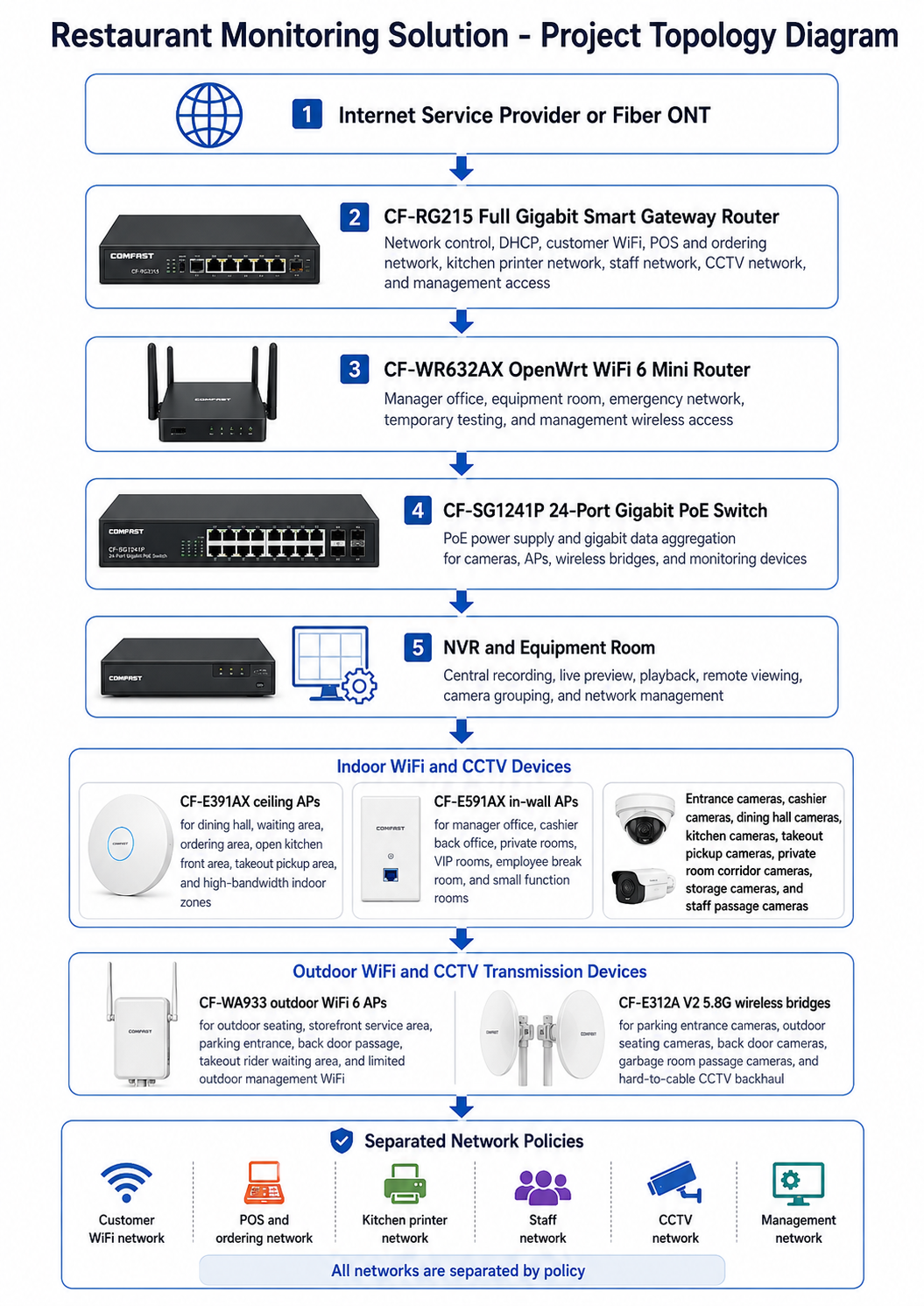
CF-RG215 Full Gigabit Smart Gateway Router: The CF-RG215 was deployed as the restaurant’s core gateway. It handled customer WiFi, POS and ordering network, kitchen printer network, staff network, CCTV network, management network, DHCP, and access policy control.
CF-SG1241P 24-Port Gigabit PoE Switch: The CF-SG1241P was used as the main PoE aggregation switch in the equipment room. It provided centralized PoE power and gigabit data aggregation for cameras, ceiling APs, in-wall APs, outdoor APs, wireless bridges, and monitoring devices.
CF-WR632AX OpenWrt WiFi 6 Mini Router: The CF-WR632AX was installed in the manager office and equipment room for authorized management wireless access, temporary testing, emergency network support, and maintenance tool connectivity.
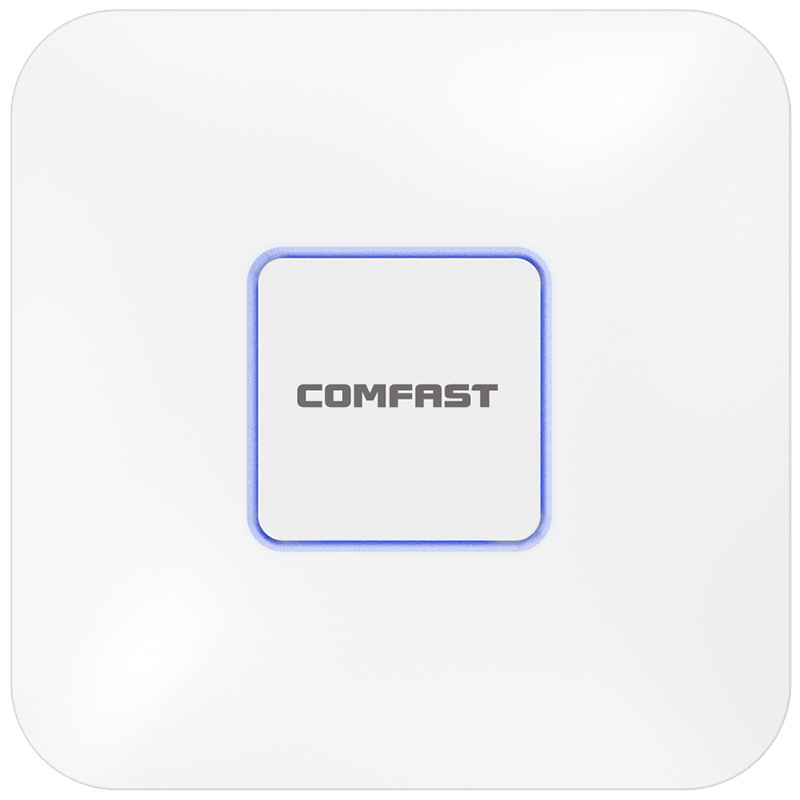
CF-E391AX WiFi 6 Ceiling AP: The CF-E391AX was used in the large dining hall, waiting area, ordering area, open kitchen front area, takeout pickup area, and high-bandwidth indoor zones. It supported peak-time customer WiFi and restaurant device access while staying separated by network policy.
CF-E591AX WiFi 6 In-Wall AP: The CF-E591AX was used in the manager office, cashier back office, private rooms, VIP rooms, employee break room, and small function rooms where room-level coverage was more appropriate than relying on dining hall APs.
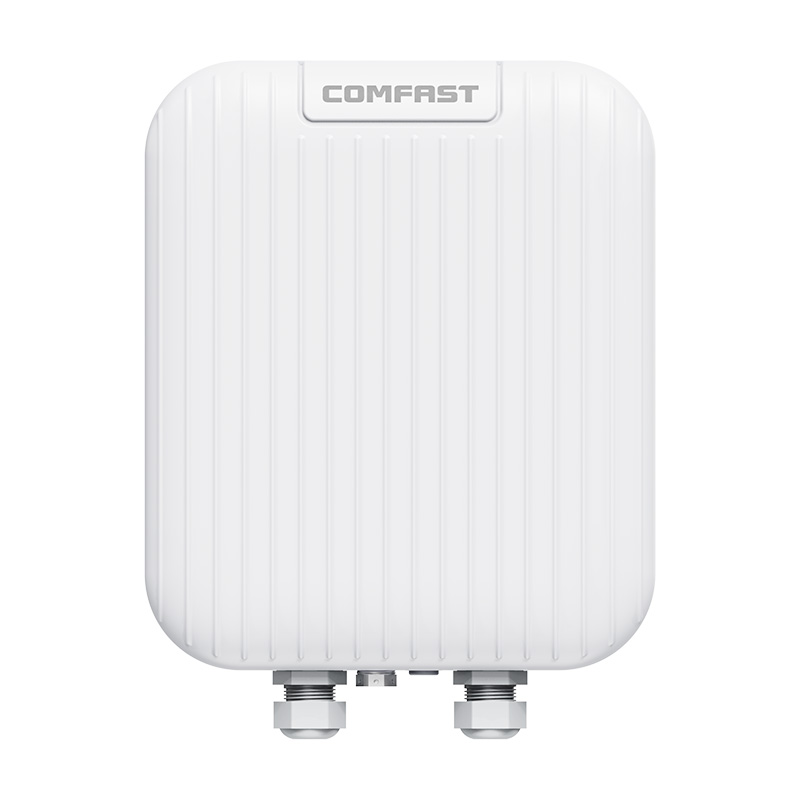
CF-WA933 Outdoor WiFi 6 AP: The CF-WA933 was deployed for outdoor seating, storefront service area, parking entrance support, back door passage, takeout rider waiting area, and limited outdoor management WiFi.
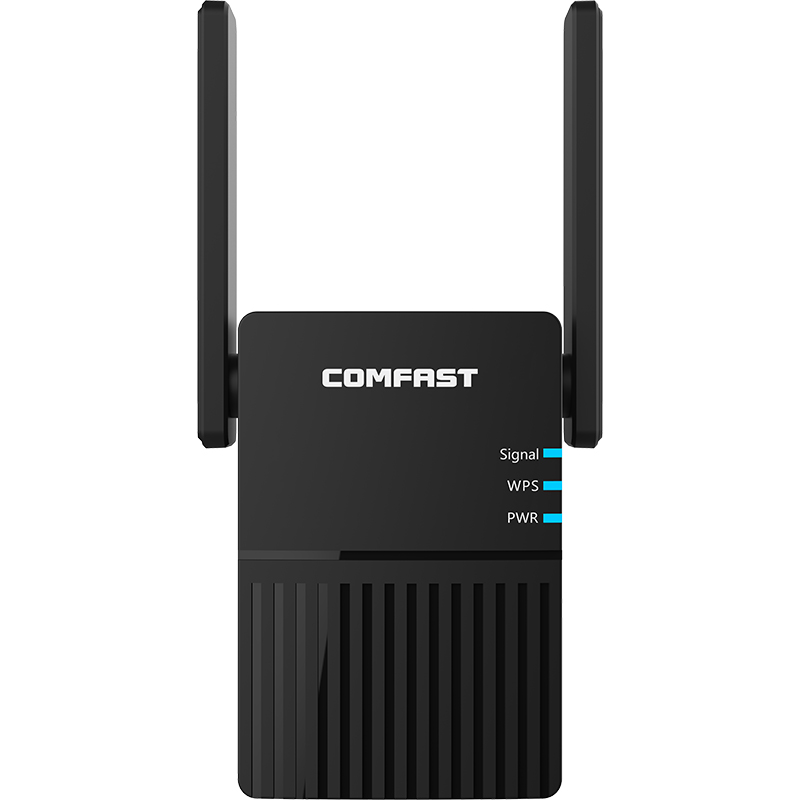
CF-E312A V2 5.8G Wireless Bridge: The CF-E312A V2 was used for stable CCTV wireless backhaul from parking entrance cameras, outdoor seating cameras, back door cameras, garbage room passage cameras, and hard-to-cable monitoring points.
5. Project Topology Diagram
6. Site Survey and Troubleshooting Process
We started the project with a full operational walkthrough together with the restaurant owner, store manager, cashier supervisor, kitchen manager, takeout coordinator, security supervisor, floor manager, and maintenance technician. We followed the real restaurant flow from entrance to waiting area, from cashier to dining hall, from ordering area to kitchen, from food pickup counter to takeout shelf, and from outdoor seating to parking entrance and back door.
At the entrance and waiting area, we checked camera angles, guest crowding, host desk position, reservation tablet usage, and WiFi demand during waiting periods. The entrance camera had to cover both arrivals and the host desk without affecting customer privacy in dining zones.
At the cashier counter, we tested POS terminals, payment devices, receipt printers, membership system access, and cashier workstation response. We confirmed that POS reliability required network separation from customer WiFi.
In the ordering area, we tested ordering tablets, QR ordering flow, staff handheld devices, and network delay during simulated peak orders. The old network had acceptable signal, but the traffic was not controlled well enough.
In the dining hall, we performed RF tests during preparation and peak dining hours. We checked customer device density, staff handheld movement, AP placement, camera coverage, ceiling structure, decorative lighting, and possible interference from nearby commercial networks.
In private rooms and VIP rooms, we checked wall materials, door positions, room layout, guest privacy requirements, and in-wall AP installation points. These rooms needed stable WiFi but required careful camera placement only at entrances and corridors.
In the open kitchen and back kitchen, we inspected heat sources, steam, oil smoke, exhaust ducts, stainless-steel surfaces, cleaning water paths, cable tray options, and camera mounting points. Kitchen camera and cable installation had to avoid high heat, heavy oil, and water cleaning paths.
At the food pickup counter and takeout area, we tested takeout platform tablets, pickup shelf visibility, printer response, rider waiting behavior, and camera angle. This zone required stable order device access and complete video coverage for pickup disputes.
At the dishwashing area, cold storage entrance, and storage room, we checked humidity, stainless-steel obstruction, door movement, water splash risk, and staff traffic. Camera positions were selected for safety and visibility without interfering with cleaning work.
At the outdoor seating area and parking entrance, we confirmed wireless bridge line of sight, camera mounting height, storefront obstruction, pedestrian path safety, and cable protection. These camera points were not practical to re-cable through the finished storefront and outdoor dining structure.
At the back door and garbage room passage, we checked security blind spots, lighting, cable route protection, camera view direction, and wireless bridge path. These areas needed stable monitoring because they were used for staff access, waste handling, and after-hours delivery.
In the equipment room, we checked the NVR, weak-current cabinet, existing switch ports, power conditions, PoE budget, old adapters, cable labels, remote viewing access, and previous camera failure records. We prepared a new topology and labeling plan before installation.
7. Problems Found During Implementation
The original router was not suitable for supporting cashier POS, ordering tablets, kitchen printers, takeout platform devices, customer WiFi, staff network, CCTV video, and remote NVR viewing at the same time. The restaurant needed a structured gateway and network segmentation plan.
POS slowdown was not simply a bandwidth issue. POS devices were mixed with guest WiFi and other devices, so customer traffic could affect payment terminals and cashier workstations during peak hours.
Kitchen printer offline events were related to WiFi coverage, device location, traffic mixing, and unstable old cabling. We placed kitchen printer traffic on a dedicated network and improved AP coverage near order processing areas.
Kitchen cameras and cables were too close to heat and oil exposure. We adjusted camera routes to avoid exhaust outlets, open flame zones, steam paths, and cleaning water spray lines.
Dining hall WiFi could not be judged only by signal strength. During lunch and dinner peaks, many guests connected to WiFi, while staff tablets, QR ordering devices, and payment devices were also active. We tested the network under real service conditions.
Outdoor seating and parking cameras were not suitable for new long cable runs. A wireless bridge backhaul design reduced construction impact and protected the restaurant’s storefront appearance.
CCTV video could not share the same network space with guest WiFi and ordering tablets. We separated CCTV traffic to improve NVR recording stability and remote viewing reliability.
Multiple APs could not be left at default high transmit power. In a restaurant with dining hall, private rooms, outdoor seating, and kitchen areas close together, excessive power creates overlap and unstable client behavior. We tuned channel and power carefully.
Construction had to avoid lunch peak, dinner peak, kitchen preparation, takeout rush, cleaning time, and guest arrival periods. We divided the work into low-traffic windows and completed most intrusive work before opening and after closing.
8. Final Engineering Solution
The CF-RG215 was deployed as the full gigabit smart core gateway for the restaurant. It separated customer WiFi, POS and ordering network, kitchen printer network, staff network, CCTV network, and management network. This prevented public guest traffic from affecting payment, ordering, printing, and monitoring systems.
The CF-SG1241P 24-port gigabit PoE switch provided centralized PoE power and data aggregation for cameras, APs, outdoor APs, wireless bridges, and NVR-connected devices. This replaced scattered adapters and simplified the weak-current cabinet.
The CF-WR632AX OpenWrt WiFi 6 mini router was deployed in the manager office and equipment room for emergency network support, temporary testing, authorized management wireless access, and maintenance tool connectivity.
CF-E391AX ceiling APs were installed in the dining hall, waiting area, ordering area, open kitchen front area, and takeout pickup area. These zones required higher WiFi capacity because they had guest devices, staff devices, and business terminals active during peak service times.
CF-E591AX in-wall APs were installed in the manager office, cashier back office, private rooms, VIP rooms, employee break room, and small function rooms. This provided room-level coverage while reducing unnecessary overlap from the main dining hall APs.
CF-WA933 outdoor WiFi 6 APs were installed for outdoor seating, storefront service area, parking entrance support, back door passage, takeout rider waiting area, and limited outdoor management WiFi. The outdoor APs were positioned discreetly to maintain the restaurant’s exterior appearance.
CF-E312A V2 5.8G wireless bridges were installed for parking entrance cameras, outdoor seating cameras, back door cameras, garbage room passage cameras, and hard-to-cable CCTV points. Each link was aligned, labeled, and tested for live preview and NVR recording stability.
9. Different Area Monitoring and Network Design
Restaurant Entrance Monitoring: Entrance cameras were adjusted to cover guest arrivals, host desk activity, and waiting flow. The design avoided unnecessary coverage of seated dining guests while preserving clear security records.
Waiting Area Coverage: CF-E391AX ceiling APs provided WiFi for waiting guests, reservation tablets, and staff handheld devices. Cameras covered queue activity and service desk interaction.
Cashier POS and CCTV Network: Cashier POS terminals, payment devices, membership terminals, receipt printers, and cashier cameras were placed on separated business and CCTV networks. This improved transaction stability and video recording reliability.
Ordering Area Network: Ordering tablets, QR ordering devices, staff handheld terminals, and service cameras were supported by CF-E391AX APs and separated network policies.
Dining Hall WiFi and Camera Coverage: Dining hall APs were positioned based on table layout, ceiling height, decorative lighting, customer density, and staff service routes. Cameras were placed to monitor general flow and service safety without affecting dining comfort.
Private Room and VIP Room Coverage: CF-E591AX in-wall APs provided room-level WiFi for private dining rooms and VIP rooms. Camera coverage focused on corridors and entrances rather than inside private dining spaces.
Open Kitchen Monitoring: Open kitchen cameras were installed to cover food preparation visibility, chef counter operations, and service safety. Cable paths avoided high heat and oil-heavy areas.
Back Kitchen Operation Area Monitoring: Back kitchen cameras covered prep lines, cooking zones, staff movement, and safety-critical areas. Mounting points avoided direct steam, open flame, exhaust outlets, and cleaning water paths.
Food Pickup Counter Monitoring: Pickup counter cameras were repositioned to cover completed dishes, staff handoff, takeout shelves, and rider pickup behavior. This reduced blind spots in takeout dispute review.
Dishwashing Area Monitoring: Dishwashing area monitoring considered humidity, water splash, stainless-steel reflection, and staff safety. Camera positions were selected to support safety review without exposing equipment to water spray.
Cold Storage Entrance Monitoring: Cold storage entrance cameras covered stock movement and door activity. Cable routes avoided door seals and condensation-prone locations.
Storage Room Monitoring: Storage room cameras covered inventory access, dry goods shelves, and staff entry points. The staff network and CCTV network remained separated.
Staff Passage Camera Backhaul: Staff passage cameras monitored back-of-house movement and after-hours access. Cameras were powered through the PoE switch and recorded to the NVR.
Manager Office Network: The manager office used CF-E591AX and CF-WR632AX for room-level staff access, management access, emergency troubleshooting, and NVR remote viewing support.
Takeout Pickup Area Network: Takeout platform tablets, pickup shelf cameras, rider waiting coverage, and pickup printers used a separated business network and CCTV coverage. This area was tested during lunch and dinner delivery peaks.
Outdoor Seating Area Monitoring: Outdoor seating cameras used CF-E312A V2 wireless bridge backhaul where new cabling would have affected the storefront finish and guest seating. CF-WA933 supported outdoor management access and limited service coverage.
Parking Entrance Camera Backhaul: Parking entrance cameras used wireless bridge return to avoid long cable runs across the public walkway. The camera backhaul was tested for day video, night video, and NVR playback.
Back Door CCTV Backhaul: Back door cameras covered staff access, delivery activity, and after-hours movement. Wireless bridge return solved the old unstable cable route problem.
Garbage Room Passage Monitoring: Garbage room passage cameras were connected through wireless bridge backhaul and protected PoE routing. This improved after-hours security and hygiene process review.
NVR and Equipment Room Network: The NVR and network devices were reorganized in the equipment room. Camera groups, APs, bridges, and switch ports were labeled for easier troubleshooting.
Remote CCTV Wireless Bridge Backhaul: CF-E312A V2 bridge links were used for hard-to-cable cameras. Each link was documented with source, destination, camera group, direction, and acceptance test result.
10. Camera, AP, and Wireless Bridge Installation Details
Camera installation was planned around security value, customer privacy, food safety, and maintenance access. We avoided unnecessary camera angles inside private dining spaces and focused monitoring on entrances, service counters, corridors, kitchens, pickup points, storage, and exterior security areas.
In the kitchen, camera cables were routed away from exhaust outlets, high-temperature cooking zones, steam paths, dishwashing spray zones, and cleaning water paths. Mounting points were selected to reduce oil accumulation and allow future cleaning access.
Ceiling APs were positioned according to table layout, customer density, ceiling decoration, and staff movement. We adjusted AP power so dining hall coverage did not overload private rooms or kitchen areas.
In-wall APs were installed in private rooms and offices to provide stable room-level coverage. This avoided weak signal complaints in enclosed rooms and reduced unnecessary high-power coverage from the hall.
Outdoor AP and wireless bridge devices were installed discreetly around the storefront, outdoor seating, parking entrance, and back-of-house exterior. We avoided visible messy cabling and protected the restaurant’s exterior appearance.
CF-E312A V2 wireless bridges were aligned for stable CCTV video rather than only checking connection status. We verified signal, bandwidth, latency, packet loss, live preview, night image, and playback from the NVR.
Every AP, camera, bridge, and switch port was labeled. The restaurant received a camera point table, AP position table, bridge direction notes, and switch port map for future maintenance.
11. NVR and Equipment Room Integration
The NVR was reorganized in the equipment room with clear camera grouping. Camera groups were renamed according to restaurant zones, including entrance, cashier, dining hall, private room corridor, open kitchen, back kitchen, pickup counter, dishwashing area, cold storage entrance, storage room, outdoor seating, parking entrance, back door, and garbage room passage.
We tested live preview, continuous recording, playback, remote viewing, and camera search after each camera group was connected. This avoided the common issue where cameras appear online but do not record reliably.
The CF-SG1241P provided centralized PoE power for cameras, APs, bridges, and monitoring devices. This reduced scattered power adapters and made power troubleshooting faster.
The CF-WR632AX allowed authorized management wireless access for the owner, IT maintenance technician, and approved engineers. This management access was separated from guest WiFi and CCTV video traffic.
12. Network Segmentation and Maintenance Design
Customer WiFi Network: The customer WiFi network served dining guests, waiting guests, outdoor seating guests, and limited public access users. It was isolated from POS, ordering, kitchen printers, staff devices, CCTV, and management equipment.
POS and Ordering Network: The POS and ordering network supported cashier POS terminals, payment devices, ordering tablets, QR ordering devices, membership terminals, and service staff handheld devices.
Kitchen Printer Network: The kitchen printer network supported kitchen printers, bar printers, seafood counter printers, takeout printers, and related order output devices. This network was protected from guest traffic to reduce print delays and offline events.
Staff Network: The staff network supported manager office devices, inventory devices, staff tablets, employee break room devices, and internal operation tools.
CCTV Network: The CCTV network carried camera video from wired cameras and wireless bridge-connected cameras to the NVR. CCTV video was separated from POS, customer WiFi, and staff browsing traffic.
Management Network: The management network was reserved for the gateway, PoE switch, router, APs, wireless bridges, NVR access, and authorized maintenance tools. Access was limited to the store owner, approved manager, and maintenance technician.
13. What We Did Differently from Other Engineering Teams
We did not simply install several cameras and leave. We checked camera angles, NVR recording, remote viewing, playback, POS stability, ordering tablet response, kitchen printer reliability, takeout peak behavior, and network isolation.
We did not only make WiFi signal look full. We tested real lunch peak, dinner peak, and takeout peak conditions because those are the periods when restaurant networks fail most often.
We did not put customer WiFi, cashier POS, ordering tablets, kitchen printers, takeout devices, CCTV, staff devices, and management equipment in one flat network. Each service was separated to protect business reliability.
We did not ignore the kitchen environment. High temperature, oil smoke, steam, water cleaning, exhaust ducts, and stainless-steel surfaces were all considered during camera and cable route selection.
We did not blindly pull cables across outdoor dining areas and finished storefronts. CF-E312A V2 wireless bridges were used where camera backhaul needed to avoid construction damage and guest disruption.
We did not interrupt restaurant service. Construction was completed by zone during approved low-traffic periods, before opening, after closing, and outside kitchen preparation and takeout rush hours.
We did not leave a messy equipment cabinet behind. The customer received device labels, camera point tables, AP location tables, wireless bridge records, switch port maps, topology notes, and acceptance test results.
14. Project Acceptance Results
Restaurant entrance camera test passed.
Waiting area camera and WiFi test passed.
Cashier POS network test passed.
Ordering system network test passed.
Kitchen printer network test passed.
Takeout platform device test passed.
Dining hall WiFi concurrency test passed.
Dining hall camera recording test passed.
Private room and VIP room WiFi test passed.
Open kitchen camera test passed.
Back kitchen operation area camera test passed.
Food pickup counter camera test passed.
Dishwashing area camera test passed.
Cold storage entrance camera test passed.
Storage room camera test passed.
Staff passage camera test passed.
Manager office network test passed.
Takeout pickup area camera and network test passed.
Outdoor seating camera backhaul test passed.
Parking entrance wireless bridge camera test passed.
Back door camera test passed.
Garbage room passage camera test passed.
NVR continuous recording test passed.
Remote viewing test passed.
Night video test passed.
PoE power supply test passed.
Wireless bridge signal test passed.
Customer WiFi, POS and ordering, kitchen printer, staff, CCTV, and management network isolation test passed.
Topology diagram, device labels, camera point list, AP location list, wireless bridge records, switch port map, and acceptance report were delivered to the customer.
15. Customer and User Feedback
Restaurant Owner Feedback: “The new system gives us a much more stable foundation. POS, ordering, kitchen printing, guest WiFi, cameras, and remote viewing are now easier to manage.”
Store Manager Feedback: “The camera coverage is clearer, and the network is more stable during our dinner peak. The documentation also makes daily maintenance easier.”
Cashier Supervisor Feedback: “The POS terminals and payment devices respond faster now, especially during busy evenings.”
Kitchen Manager Feedback: “Kitchen printer reliability improved a lot. We see fewer delayed print jobs during lunch and dinner rush.”
Takeout Coordinator Feedback: “The pickup area cameras now cover the shelf and rider waiting zone better. Takeout tablets and printers are also more stable during peak delivery hours.”
Security Supervisor Feedback: “NVR playback is smoother, and outdoor seating, parking entrance, back door, and garbage room passage cameras are much more stable.”
Floor Manager Feedback: “Staff handheld devices roam more smoothly across the dining hall, private room corridor, and pickup counter.”
IT Maintenance Technician Feedback: “The labels, camera point table, AP location list, and bridge records make troubleshooting much faster. The equipment room is much cleaner than before.”
16. Project Summary
Project MetroBistro Secure Network was a successful Restaurant Monitoring Solution for a flagship seafood restaurant in Sydney. The project solved cashier POS slowdown, ordering tablet delay, kitchen printer offline issues, takeout platform instability, dining hall recording frame loss, kitchen cable aging, pickup area camera blind spots, outdoor seating camera backhaul difficulty, parking entrance camera cabling challenges, back door camera dropouts, garbage room passage monitoring instability, remote NVR viewing issues, and weak-current cabinet disorder.
The final COMFAST solution used the CF-RG215 full gigabit smart gateway router, CF-SG1241P 24-port gigabit PoE switch, CF-WR632AX OpenWrt WiFi 6 mini router, CF-E391AX ceiling APs, CF-E591AX in-wall APs, CF-WA933 outdoor WiFi 6 APs, and CF-E312A V2 5.8G wireless bridges. This combination supported POS stability, ordering system reliability, kitchen printer protection, guest WiFi separation, staff network access, CCTV recording, outdoor camera backhaul, remote viewing, and centralized maintenance.
The key value of this project was not simply adding cameras or improving WiFi signal. The real value was designing the restaurant monitoring and network system around business continuity, peak dining traffic, kitchen environment protection, takeout operations, outdoor camera backhaul, network segmentation, NVR reliability, and long-term maintenance.
17. Lessons Learned and Advice to Other Contractors
Restaurant monitoring projects must start from real operating workflow, not only camera quantity.
Cashier POS, ordering tablets, kitchen printers, takeout devices, CCTV, staff devices, and customer WiFi must be separated by network policy.
Kitchen cabling and cameras must avoid high temperature, oil smoke, steam, cleaning water, and food preparation interference.
Dining hall WiFi must be tested during lunch and dinner peaks, not only before opening when the room is empty.
Takeout pickup areas require both network stability and complete camera angles because order disputes often happen there.
Outdoor seating and parking cameras can use wireless bridge backhaul when cabling would damage storefront design or disturb guests.
NVR continuous recording, playback, remote viewing, and night video must be tested as part of acceptance.
Construction windows must avoid meal peaks, preparation periods, takeout rush hours, cleaning times, and fire exit routes.
Professional handover must include topology diagram, camera point list, AP location list, bridge records, switch port labels, and maintenance notes.
For restaurant projects, engineers should walk through the full service path: guest entrance, waiting area, cashier, dining hall, private rooms, ordering area, kitchen, pickup counter, storage, back door, outdoor seating, and parking entrance. A good restaurant monitoring solution must follow the real movement of guests, staff, food, orders, riders, and security events.
Do not treat restaurant networks as simple WiFi installations. The real goal is business stability. If POS, ordering tablets, kitchen printers, takeout systems, cameras, and remote viewing are unstable during peak hours, the project has not been properly engineered.
A Restaurant Monitoring Solution is complete only when POS is stable, ordering is smooth, kitchen printers are reliable, takeout devices work during peak hours, NVR recording is continuous, outdoor and parking cameras transmit clearly, customer WiFi is isolated, and the restaurant team can maintain the system confidently. That was the standard we delivered for Project MetroBistro Secure Network.