Project Riverside Estate Full Coverage: Complete WiFi and CCTV Wireless Transmission Solution for a Residential Estate in Singapore
Contractor Team Introduction
We are a local Shenzhen WiFi engineering contractor with long-term experience in residential estate WiFi coverage, luxury condominium networks, villa community WiFi, clubhouse WiFi, underground garage coverage, elevator lobby roaming, property office networks, access control device networks, parcel locker connectivity, community retail POS networks, outdoor garden WiFi, security booth networks, CCTV wireless transmission, parking entrance camera backhaul, PoE-powered network deployment, and multi-service network isolation projects.
A residential estate network is very different from a single building office network. It has multiple blocks, property service areas, common facilities, outdoor gardens, underground garages, access gates, smart devices, community merchants, security cameras, and resident-facing public areas. The network must support resident public WiFi, property office work, access control systems, parcel lockers, POS terminals, security monitoring, maintenance tools, and long-term estate operations.
Our team has used COMFAST equipment in many residential community, commercial building, resort, office campus, and CCTV backhaul projects. From our field experience, COMFAST smart gateways, WiFi 6 routers, PoE switches, ceiling APs, in-wall APs, outdoor APs, and wireless bridges provide a practical balance of stable performance, flexible deployment, clean installation, and maintainable network management. For this project, we selected COMFAST CF-AC101 gigabit AC smart gateway router, CF-SG181P 8-port gigabit PoE switch, CF-WR632AX WiFi 6 Mesh portable router, CF-E390AX WiFi 6 ceiling APs, CF-E591AX WiFi 6 in-wall APs, CF-WA937 outdoor WiFi 6 APs, CF-WA933 outdoor WiFi 6 APs, and CF-E112N V2 wireless bridges.
This case study documents our Residential Estate Full Coverage project for Riverside Estate, a high-end residential community in Singapore. The project covered the main entrance, visitor registration area, property service center, owner clubhouse, fitness center, yoga room, swimming pool area, children’s activity area, community garden, landscape walkways, public rest areas, stilt floors, building lobbies, elevator lobbies, underground garage, parking entrance, EV charging area, parcel locker area, community retail street, convenience store, coffee shop, security booth, equipment rooms, estate roads, estate boundary areas, remote CCTV camera points, and temporary community event areas.
1. Project Overview
Basic Project Information
Project Name: Project Riverside Estate Full Coverage
Project Location: Singapore
Site Type: High-end residential estate with multiple residential blocks, clubhouse facilities, underground garage, retail street, outdoor garden areas, and security monitoring points
Total Estate Area: Approximately 118,000 square meters
Residential Units: 1,280 apartments across 12 residential blocks
Underground Garage Area: Approximately 32,000 square meters
Public Facility Area: Approximately 18,000 square meters including clubhouse, gym, yoga room, poolside facilities, children’s activity area, and public rest areas
Daily Resident and Visitor Flow: Around 5,000 people on normal weekdays
Peak Community Activity Flow: More than 8,500 people during weekends, holiday gatherings, community events, and poolside family activity periods
Main Coverage Areas: Main entrance, visitor registration, property service center, clubhouse, fitness center, yoga room, swimming pool, children’s activity area, community garden, landscape walkway, stilt floors, building lobbies, elevator lobbies, underground garage, parking entrance, EV charging area, parcel locker area, community retail street, security booth, estate roads, and CCTV points
Project Cycle: Six weeks from site survey to final acceptance, completed through phased construction during low-traffic periods, daytime property maintenance windows, and night work windows approved by estate management.
2. Customer Pain Points Before the Project
Visitor Registration Network Was Slow During Entry Peaks
The main entrance visitor registration area often became slow during morning delivery periods, evening resident return periods, and weekend visitor peaks. Visitor registration tablets, security guard devices, QR code verification, and camera access competed with general public network traffic.
Property Service Center WiFi Was Unstable
The property service center handled resident requests, parcel issues, access card services, maintenance reports, and visitor coordination. The old wireless network was unstable in several office corners and meeting rooms, affecting staff efficiency.
Clubhouse and Fitness Center Slowed Down During Busy Hours
The owner clubhouse, gym, and yoga room had many mobile devices, smart fitness equipment, booking tablets, staff devices, and guest devices online at the same time. The original AP layout had signal, but capacity and roaming were not stable during evening peaks.
Elevator Lobbies and Stilt Floors Had Discontinuous Coverage
Residents moved between building lobbies, elevator lobbies, stilt floors, and outdoor common areas. The old network had coverage gaps and sticky-client behavior, causing phones and property devices to hold weak signals instead of roaming smoothly.
Underground Garage Had Severe Signal Loss
The underground garage had concrete walls, pillars, turning ramps, parked vehicles, fire doors, and low ceilings. The previous WiFi signal dropped sharply in several sections, especially near the parking entrance, EV charging area, and delivery vehicle zone.
Swimming Pool and Children’s Activity Areas Needed Outdoor Coverage
The poolside area, children’s play area, garden seating, and outdoor rest spaces had many family users during weekends. Residents wanted stable WiFi for messaging, video calls, community apps, and guest access, but the old signal was weak and uneven.
Parcel Lockers, Access Control, and Smart Devices Were Mixed with Public WiFi
Parcel lockers, access control terminals, smart notice boards, property tablets, and some IoT devices were not properly separated from resident public WiFi. This created operational risk and made troubleshooting difficult.
Community Retail POS Needed More Reliable Network Access
The convenience store, coffee shop, and small retail units used POS terminals, ordering tablets, and payment devices. These devices sometimes shared the same access environment as guest WiFi, causing payment delay during busy hours.
Remote CCTV Points Were Difficult to Cable
Parking entrance cameras, boundary cameras, community garden cameras, underground garage entrance cameras, and remote security points were difficult to cable without affecting roads, landscaping, resident access, and vehicle movement. Wireless bridge backhaul was the most practical approach for these locations.
Weak Current Rooms and AP Records Were Incomplete
The estate network had been expanded several times by different teams. Some switch ports were not labeled, AP locations were not recorded, and several camera links were difficult to identify. The property team needed a professional handover with clear documentation.
3. Customer Requirements
Confirmed Requirements from Estate Management
Stable indoor and outdoor public WiFi coverage across the residential estate common areas.
Reliable network access for the property office, property service center, visitor registration desk, security booth, and maintenance team.
Stable WiFi for the owner clubhouse, fitness center, yoga room, poolside area, children’s activity area, community garden, and public rest spaces.
Continuous coverage for building lobbies, elevator lobbies, stilt floors, underground garage entrances, and estate walkways.
Reliable access for access control devices, parcel lockers, smart notice boards, property tablets, and maintenance devices.
Stable merchant POS network for the convenience store, coffee shop, and community retail units.
Reliable CCTV wireless backhaul for parking entrance cameras, boundary cameras, garden cameras, remote monitoring points, and underground garage entrance cameras.
Resident public WiFi, property office network, access control and smart device network, merchant POS network, CCTV network, and management network separated by policy.
Centralized PoE power supply for APs, outdoor APs, wireless bridges, and selected monitoring devices.
Clean installation that does not affect landscape design, building appearance, resident privacy, vehicle access, or merchant operation.
Clear handover documentation, including topology diagram, AP location map, switch port labels, bridge alignment records, and maintenance guidance.
4. COMFAST Equipment Used in This Project
The following are the main COMFAST equipment models used in this project and their usage descriptions.
| Equipment Model |
Type | Project Use | Reason for Use |
|---|---|---|---|
| CF-AC300 | Full gigabit core gateway | Network control, DHCP, resident network policy, guest WiFi policy, property management network policy, IoT network planning, CCTV network planning, and management access | Suitable as the residential estate core gateway, separating resident traffic from guest access, property management, IoT devices, CCTV streams, and network management systems |
| CF-SG1241P | 24-port gigabit PoE switch | PoE power supply and wired distribution for ceiling APs, in-wall APs, outdoor APs, wireless bridges, and selected monitoring devices | Centralized PoE deployment reduces local power adapters, simplifies weak-current room management, and supports easier maintenance across buildings and public areas |
| CF-E390AX | WiFi 6 ceiling AP | Building lobbies, corridors, clubhouse, fitness room, children’s activity room, property office, and indoor public service areas | Suitable for stable indoor public-area coverage, providing better performance for resident services, property staff, and visitor access |
| CF-E593AX | WiFi 6 in-wall AP | Apartment rooms, villa rooms, offices, property rooms, meeting rooms, and wall-separated indoor spaces | Provides room-level coverage and reduces signal attenuation caused by walls, doors, and multi-room residential layouts |
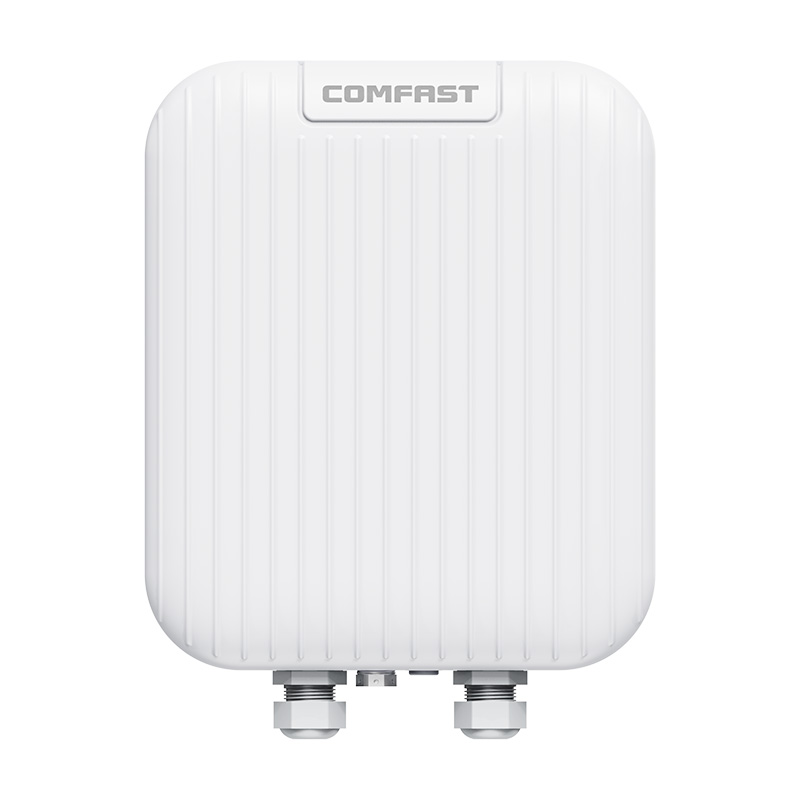
| CF-WA937 | Outdoor WiFi 6 AP | Gardens, entrance areas, public walkways, leisure areas, children’s playground, outdoor fitness areas, and main community activity zones | Selected for main outdoor resident activity areas, providing stable outdoor WiFi coverage for residents, visitors, and property service devices |
| CF-WA933 | Outdoor WiFi 6 AP | Parking lots, peripheral roads, secondary walkways, security booth surroundings, and low to medium-density outdoor areas | Complements outdoor coverage in peripheral areas without overbuilding every low-density zone with higher-capacity outdoor APs |
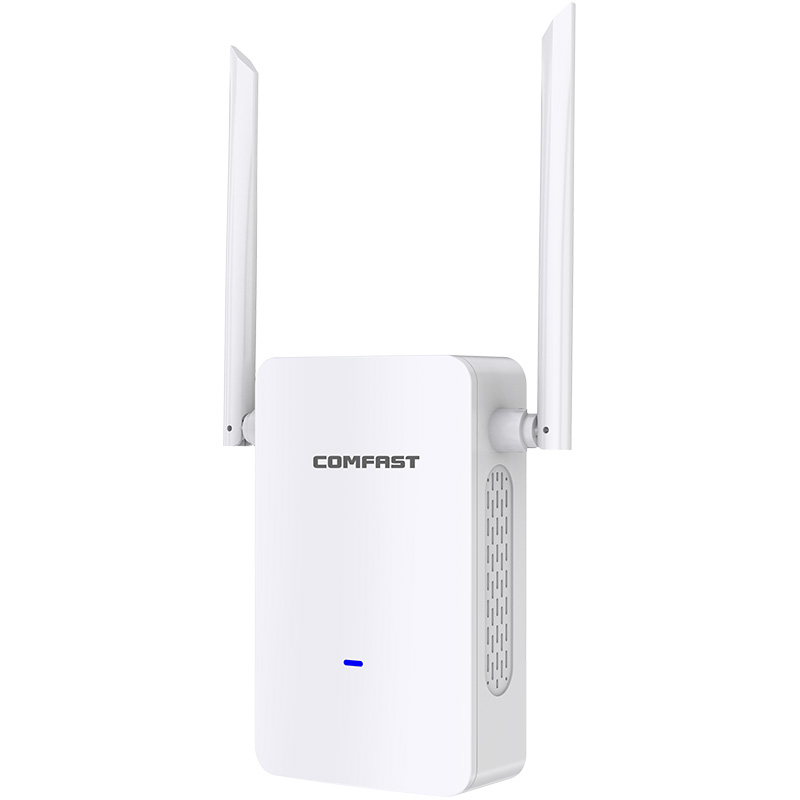
| CF-E319A V3 | Long-distance wireless bridge | CCTV wireless transmission for remote parking areas, estate boundary cameras, garden edge cameras, and hard-to-cable monitoring points | Avoids trenching through landscaped areas, community roads, and completed residential facilities while maintaining stable CCTV backhaul transmission |
5. Project Equipment Configuration Quantity
Based on the residential estate buildings, villa areas, apartment rooms, indoor public areas, gardens, entrances, public walkways, parking lots, peripheral areas, CCTV transmission points, property management requirements, and future smart community service expansion, the recommended equipment configuration for this project was as follows:
| Equipment Model | Quantity | Deployment Location |
|---|---|---|
| CF-AC300 | 1 unit | Main equipment room, used as the core gateway for resident network, guest WiFi, property management network, IoT network, CCTV network, and management access |
| CF-SG1241P | 6 units | Main equipment room, building weak-current rooms, villa area distribution points, clubhouse distribution point, outdoor garden distribution point, and parking / perimeter distribution points for PoE power, AP connection, bridge connection, uplink ports, and expansion reserve |
| CF-E390AX | 40 units | Building lobbies, corridors, clubhouse, fitness room, children’s activity room, property office, elevator halls, and indoor public service areas |
| CF-E593AX | 120 units | Apartment rooms, villa rooms, property offices, meeting rooms, independent rooms, and wall-separated indoor spaces requiring room-level coverage |
| CF-WA937 | 15 units | Gardens, entrance areas, public walkways, leisure areas, children’s playground, outdoor fitness areas, and main community activity zones |
| CF-WA933 | 10 units | Parking lots, peripheral roads, secondary walkways, security booth surroundings, estate boundary areas, and low to medium-density outdoor coverage zones |
| CF-E319A V3 | 8 pairs | Remote parking area cameras, estate boundary cameras, garden edge cameras, entrance monitoring points, and hard-to-cable CCTV transmission locations |
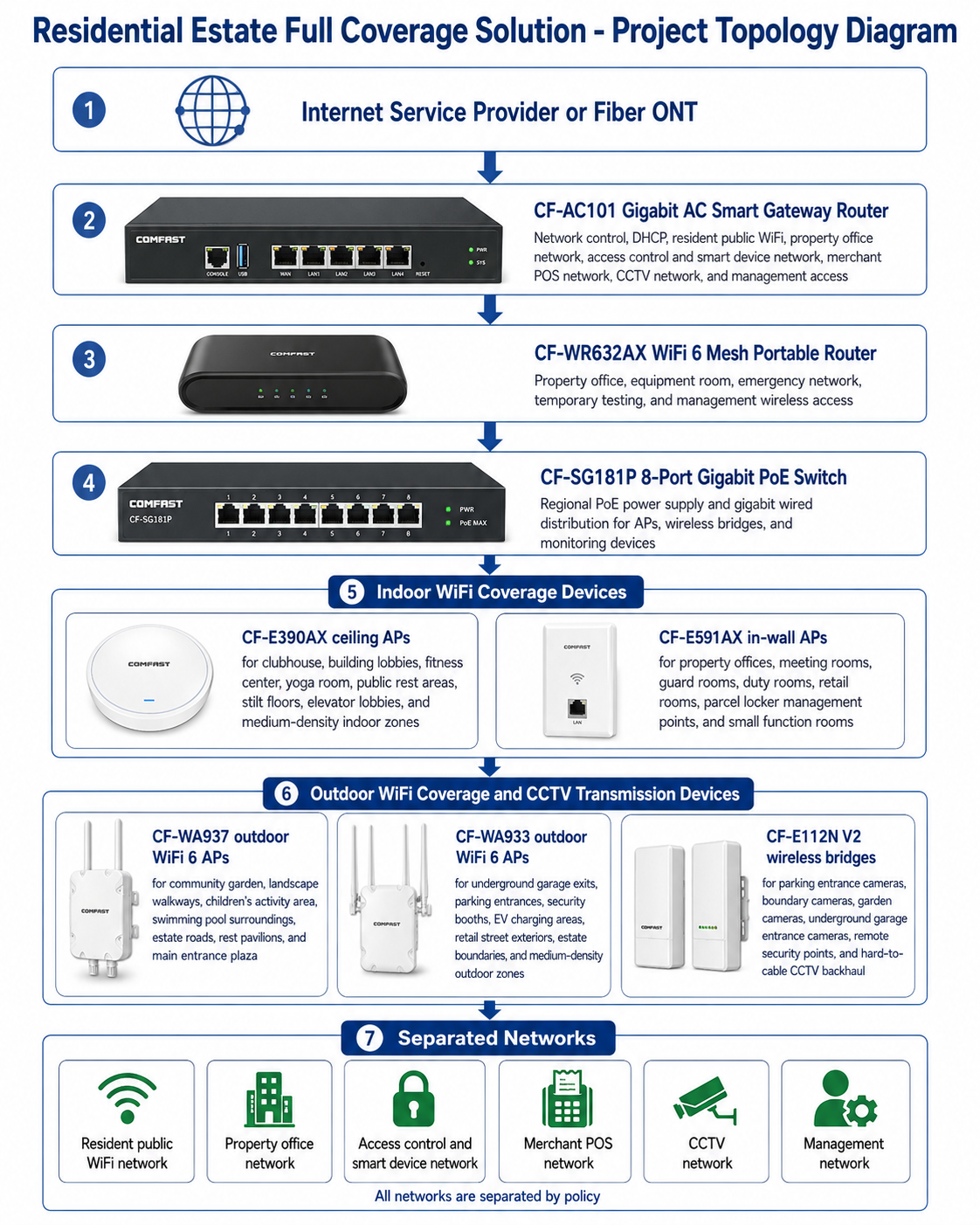
6. Project Topology Diagram
Overall Network Topology
7. Site Survey and Troubleshooting Process
Resident Movement and Entry Flow Analysis
We observed resident movement at the main entrance, visitor registration area, building lobbies, elevator lobbies, parking entrance, parcel locker zone, clubhouse, garden paths, poolside area, and retail street. The estate had different traffic patterns in the morning, evening, weekends, and community activity periods.
Main Entrance and Visitor Registration Test
We tested visitor registration tablets, guard devices, QR code access, camera viewing, and network response during busy entry periods. The entrance required reliable staff and access control networks, not only public WiFi.
Clubhouse and Fitness Center Concurrency Review
We observed the clubhouse, fitness center, yoga room, and public rest areas during evening hours. The issue was not only signal strength. Device density, smart equipment, staff tablets, and resident usage created capacity pressure.
Building Lobby, Elevator Lobby, and Stilt Floor Roaming Test
We tested roaming between building entrances, lobby seating areas, elevator waiting areas, stilt floors, and outdoor garden exits. AP power and placement had to support smooth transition without excessive overlap.
Underground Garage Signal Test
We tested the underground garage around ramps, concrete pillars, parking aisles, vehicle turning points, fire doors, and EV charging areas. The strongest signal loss appeared at ramp corners and areas blocked by vehicles and concrete structures.
Outdoor Garden, Pool, and Children’s Area RF Test
We tested the community garden, landscape walkway, swimming pool surroundings, children’s activity area, rest pavilions, and outdoor seating. Outdoor AP locations were selected around real resident activity zones rather than only pole availability.
Access Control, Parcel Locker, and Smart Device Testing
We tested access control readers, parcel locker devices, smart notice boards, property tablets, and maintenance devices. These devices required a separated network policy to avoid interference from resident public WiFi.
Community Merchant POS Testing
We tested POS terminals, ordering tablets, printers, and payment devices in the convenience store, coffee shop, and small retail units. The merchant POS network had to remain stable during resident and visitor traffic peaks.
CCTV Wireless Bridge Path Survey
We inspected parking entrance cameras, estate boundary cameras, garden cameras, underground garage entrance cameras, and remote security points. For each CF-E112N V2 bridge link, we checked line of sight, mounting height, obstruction from trees or buildings, power access, cable protection, and maintenance access.
Weak Current Room and PoE Readiness Check
We inspected small weak current rooms, patch panels, old switches, grounding, PoE requirements, cable routes, and label status. Several rooms needed cleanup before reliable operation and handover could be completed.
8. Problems Found During Implementation
The Old Network Could Not Support a Multi-Zone Estate
The previous design extended property office WiFi into multiple estate areas without a clear multi-zone plan. It could not support public facilities, outdoor areas, security systems, merchants, and smart devices at the same time. We rebuilt the structure around the CF-AC101 gateway and segmented policies.
Underground Garage Coverage Needed More Than One AP Near the Entrance
The garage problem was not solved by placing one AP at the ramp. Concrete pillars, vehicles, ramp turns, and fire doors created dead zones. We planned coverage around garage structure, vehicle movement, and EV charging activity.
Elevator Lobbies and Stilt Floors Needed Roaming Optimization
Phones and property devices moved continuously between building lobbies, elevator lobbies, stilt floors, and outdoor gardens. We tuned AP power and placement to reduce sticky-client behavior and improve roaming continuity.
Clubhouse and Gym Required Capacity Planning
The clubhouse and fitness center had many concurrent users during evening hours. CF-E390AX APs were positioned based on user dwell time, equipment layout, and actual device density.
Outdoor Family Areas Needed Dedicated Outdoor APs
The poolside, children’s activity area, garden, and rest pavilions could not depend on indoor AP leakage. CF-WA937 outdoor APs were used to provide proper outdoor coverage.
Smart Devices and Merchant POS Needed Isolation
Access control, parcel lockers, smart notice boards, merchant POS terminals, and CCTV cameras could not share the same access policy as resident public WiFi. Network segmentation was necessary for reliability and security.
Remote Cameras Were Not Practical to Cable
Several camera points would have required trenching, road crossing, garden work, or garage route changes. CF-E112N V2 wireless bridges provided CCTV backhaul while reducing construction impact.
Construction Had to Avoid Resident Disruption
Installation could not block resident entry, vehicle access, merchant operation, pool use, or community events. We worked by zone, used low-traffic construction windows, and coordinated daily with property management.
9. Final Engineering Solution
Core Gateway and Network Policy Control
The CF-AC101 was deployed as the estate’s core smart gateway router. It provided DHCP, network control, and policy separation for resident public WiFi, property office network, access control and smart device network, merchant POS network, CCTV network, and management network.
Management Wireless Access and Emergency Testing
The CF-WR632AX was installed in the property office and equipment room. It supported management access, temporary testing, maintenance tools, and emergency wireless service during commissioning.
Regional PoE Distribution
CF-SG181P PoE switches were placed in key regional weak current rooms. This allowed local PoE power for APs and bridges without running every device back to one long-distance cabinet.
Indoor Common Area Coverage
CF-E390AX ceiling APs were installed in clubhouse areas, building lobbies, fitness rooms, yoga rooms, public rest areas, stilt floors, elevator lobbies, and other medium-density indoor spaces.
Room-Level and Small Functional Area Coverage
CF-E591AX in-wall APs were installed in property offices, guard rooms, duty rooms, meeting rooms, community retail rooms, parcel locker management points, and small function rooms.
Outdoor Public Area Coverage
CF-WA937 outdoor APs were used in resident-facing outdoor areas such as community gardens, landscape walkways, children’s activity areas, swimming pool surroundings, rest pavilions, estate roads, and the main entrance plaza.
Operational Outdoor Coverage and CCTV Backhaul
CF-WA933 outdoor APs covered parking entrances, security booths, EV charging areas, underground garage exits, retail street exteriors, and estate boundaries. CF-E112N V2 wireless bridges carried CCTV traffic from hard-to-cable camera points.
10. Different Area Network Design
Main Entrance and Visitor Registration Coverage
The main entrance used CF-WA937 outdoor APs for external approach coverage and CF-E591AX in-wall APs in the guard and registration room. Visitor registration devices were placed on a controlled property and access control network rather than resident public WiFi.
Property Service Center Coverage
The property service center used CF-E591AX in-wall APs and CF-WR632AX management access. Office staff, resident service tablets, printers, and maintenance workstations were separated from public WiFi traffic.
Owner Clubhouse Coverage
The owner clubhouse used CF-E390AX ceiling APs to cover lounge seating, activity rooms, reception, public rest areas, and shared facility zones. The design considered user density during evening and weekend activity.
Fitness Center and Yoga Room Coverage
The fitness center and yoga room used CF-E390AX APs. AP placement considered mirrors, metal equipment, smart fitness devices, user movement, and evening concurrency.
Swimming Pool Area Coverage
The poolside area used CF-WA937 outdoor APs. APs were positioned toward seating zones, poolside walkways, and public rest areas while avoiding direct splash and visually disruptive mounting points.
Children’s Activity Area Coverage
The children’s activity area was treated as a family dwell zone. CF-WA937 APs provided outdoor coverage for parents, visitors, and property staff devices.
Community Garden Coverage
The community garden used CF-WA937 APs to support resident public WiFi, staff communication, and garden-area CCTV needs. AP direction was adjusted around real gathering zones and landscape structures.
Landscape Walkway Coverage
Landscape walkways required continuous roaming support for residents moving between blocks and facilities. We placed outdoor APs to cover walking paths, rest points, and transition zones.
Public Rest Area Coverage
Public rest areas used a mix of CF-E390AX indoor APs and CF-WA937 outdoor APs depending on location. These zones were designed for longer resident dwell time.
Stilt Floor Coverage
Stilt floors used CF-E390AX APs to provide WiFi between building lobbies, outdoor garden exits, seating areas, and community notice areas. Roaming settings were tuned carefully to avoid sticky-client behavior.
Building Lobby Coverage
Building lobbies used CF-E390AX ceiling APs. The network supported resident public WiFi, property tablets, smart notice boards, and access-related service devices with policy separation.
Elevator Lobby Coverage
Elevator lobbies required stable roaming and short-stay connectivity. AP positions and power levels were tuned so mobile devices could transition smoothly from lobby to corridor and stilt floor areas.
Underground Garage Coverage
The underground garage used targeted AP and outdoor transition coverage around ramps, entry lanes, EV charging areas, parcel delivery routes, and camera points. We avoided treating the garage as a simple open hall because pillars and vehicles changed signal behavior.
Parking Entrance Coverage
The parking entrance used CF-WA933 APs and CF-E112N V2 wireless bridges. This supported staff devices, camera backhaul, access management, and vehicle entry monitoring.
EV Charging Area Coverage
The EV charging area needed stable connectivity for resident apps, charging management devices, and maintenance access. CF-WA933 APs were selected for this operational outdoor zone.
Parcel Locker Area Network
Parcel lockers and management points used the access control and smart device network. CF-E591AX in-wall APs provided room-level coverage where lockers were located inside enclosed areas.
Community Retail Street POS Network
The retail street used dedicated merchant POS network access for payment devices, ordering tablets, and printers. Resident public WiFi remained separated from merchant transaction traffic.
Convenience Store and Coffee Shop Network
The convenience store and coffee shop used CF-E591AX APs for indoor rooms and CF-WA933 APs for storefront exterior coverage. POS, staff devices, and public customer WiFi were separated by policy.
Security Booth Coverage
Security booths used CF-E591AX in-wall APs and CF-WA933 outdoor APs. Security staff devices and CCTV viewing tools were kept on controlled networks.
Estate Road and Boundary Coverage
Estate roads and boundary areas used CF-WA933 APs and CF-E112N V2 wireless bridge links. The design supported patrol staff, maintenance work, camera monitoring, and remote security points.
11. Indoor and Outdoor AP Installation Details
Indoor AP Installation
Indoor APs were installed according to ceiling height, lobby design, clubhouse layout, elevator lobby structure, stilt floor airflow, cable route, and maintenance access. In resident-facing spaces, device placement had to be clean and visually acceptable.
In-Wall AP Installation
CF-E591AX in-wall APs were installed in smaller rooms where dedicated room-level access was needed. This avoided forcing ceiling APs to over-cover enclosed rooms and improved stability for property staff, guard rooms, and merchant spaces.
Outdoor AP Installation
Outdoor APs were installed around actual resident activity areas, including gardens, walkways, poolside seating, children’s areas, entrance plazas, and estate roads. Device height and direction were selected to balance coverage, appearance, safety, and maintenance access.
Underground Garage Installation
Garage installation required careful cable protection, AP location planning, and avoidance of vehicle impact zones. We avoided mounting devices where trucks, maintenance equipment, or parked vehicles could damage them.
Channel and Power Optimization
After installation, we tuned channels and transmit power. We did not set all APs to maximum power. In a multi-block residential estate, excessive power creates interference and sticky-client problems. Correct tuning improved roaming and stability.
Cable Labeling and Weak Current Room Organization
Every AP, wireless bridge, and key switch port was labeled. We cleaned weak current rooms, updated port records, documented bridge directions, and delivered clear diagrams for future maintenance.
12. Wireless Bridge Transmission Design
Parking Entrance Camera Backhaul
Parking entrance cameras used CF-E112N V2 wireless bridges to avoid road cutting and vehicle lane interruption. The link was tested during normal traffic and evening vehicle peaks.
Estate Boundary Camera Backhaul
Boundary cameras were far from the nearest weak current room. Wireless bridge links allowed CCTV return without trenching along landscaped boundary areas.
Community Garden Camera Backhaul
Garden cameras were connected through wireless bridge links where cabling would have affected trees, lawns, and pedestrian routes. The system supported night patrol monitoring.
Underground Garage Entrance Camera Transmission
Garage entrance cameras needed stable backhaul for vehicle monitoring. CF-E112N V2 bridges reduced the need for difficult cable routing around ramps and concrete structures.
Remote Security Point Backhaul
Remote security points used CF-E112N V2 bridge links for CCTV return. Each link was checked for video continuity, delay, night monitoring quality, and stable alignment.
13. Network Segmentation and Security Design
Resident Public WiFi Network
The resident public WiFi network served residents and visitors in public areas such as clubhouse, gardens, poolside area, lobbies, and walkways. It was isolated from property systems, access control, POS, CCTV, and management devices.
Property Office Network
The property office network supported service center staff, management computers, maintenance tablets, printers, and administrative systems. It was separated from resident public WiFi.
Access Control and Smart Device Network
The access control and smart device network supported gate readers, visitor registration tablets, parcel lockers, smart notice boards, and selected property IoT devices. This network was protected from public user traffic.
Merchant POS Network
The merchant POS network supported the convenience store, coffee shop, and retail tenants. Payment terminals, ordering tablets, and printers were isolated from resident public WiFi.
CCTV Network
The CCTV network carried video traffic from wired cameras and CF-E112N V2 wireless bridge links. Keeping camera traffic separate improved monitoring reliability and troubleshooting clarity.
Management Network
The management network was reserved for the gateway, portable router, PoE switches, APs, wireless bridges, and authorized maintenance devices. Access was limited to estate IT and approved engineering staff.
14. What We Did Differently from Other Engineering Teams
We Did Not Extend Property Office WiFi into the Whole Estate
Residential estate WiFi cannot be solved by pushing office WiFi into public areas. We built a segmented estate network for residents, property staff, access devices, merchants, CCTV, and management.
We Designed Around Real Resident Movement
We studied how residents moved from parking to lobby, from elevator to stilt floor, from garden to clubhouse, and from poolside to retail street. AP placement followed actual movement and dwell time.
We Treated the Underground Garage as a Special RF Environment
The garage required its own planning because concrete, vehicles, ramps, and fire doors changed signal behavior. We did not treat it as a normal indoor corridor.
We Protected Access Control, Smart Devices, and POS Terminals
Access control, parcel lockers, smart devices, and merchant POS terminals were separated from resident public WiFi. This improved reliability and security.
We Used Wireless Bridges Instead of Disruptive Trenching
For remote CCTV points, CF-E112N V2 wireless bridges allowed stable backhaul without cutting roads, gardens, and parking areas.
We Delivered a Maintainable System
The customer received AP location records, bridge alignment notes, switch port labels, topology documentation, network segmentation notes, and maintenance guidance. The system was built for long-term estate operation.
15. Project Acceptance Results
Final Acceptance Checklist
Main entrance and visitor registration network test passed.
Property service center network test passed.
Owner clubhouse WiFi coverage test passed.
Fitness center and yoga room concurrency test passed.
Swimming pool surrounding WiFi test passed.
Children’s activity area WiFi test passed.
Community garden and landscape walkway coverage test passed.
Stilt floor coverage test passed.
Building lobby and elevator lobby roaming test passed.
Underground garage coverage test passed.
Parking entrance network and CCTV test passed.
EV charging area network test passed.
Parcel locker network test passed.
Access control device network test passed.
Community merchant POS transaction test passed.
CF-E112N V2 wireless bridge CCTV backhaul test passed.
Resident public WiFi, property office, access control and smart device, merchant POS, CCTV, and management network isolation test passed.
Device labels, AP map, bridge alignment records, switch port map, topology diagram, and IT handover completed.
16. Customer and User Feedback
Property Manager Feedback
The property manager said, “The estate network is now much easier to manage. Visitor registration, clubhouse WiFi, smart devices, and CCTV are no longer mixed together in one confusing network.”
Estate Operations Manager Feedback
The estate operations manager reported that the main entrance, poolside area, garden walkways, clubhouse, and parking entrance became much more stable after the upgrade.
IT Supervisor Feedback
The IT supervisor said, “The labels, topology map, and segmented networks are very helpful. We can now identify APs, bridges, and switch ports without guessing.”
Security Supervisor Feedback
The security supervisor confirmed that parking entrance, boundary, garden, and garage entrance camera feeds became more stable after the CF-E112N V2 bridge deployment.
Clubhouse Manager Feedback
The clubhouse manager reported better WiFi stability in the gym, yoga room, lounge, and activity rooms during evening peak hours.
Merchant Representative Feedback
A coffee shop representative said, “POS transactions are more stable now, especially during weekend mornings and community events.”
Resident User Feedback
Residents reported smoother WiFi access in the clubhouse, poolside area, garden walkways, building lobbies, and public rest areas.
Maintenance Technician Feedback
The maintenance technician appreciated the clean AP labels, switch port records, and service-friendly installation positions in garages, lobbies, and outdoor areas.
17. Project Summary
Final Result
Project Riverside Estate Full Coverage was a successful Residential Estate Full Coverage solution. The project solved slow visitor registration, unstable property office WiFi, clubhouse and gym congestion, elevator lobby and stilt floor roaming gaps, underground garage signal loss, weak poolside and garden coverage, mixed smart device traffic, unstable merchant POS access, remote CCTV backhaul issues, and incomplete network documentation.
The final COMFAST solution used the CF-AC101 gigabit AC smart gateway router, CF-SG181P 8-port gigabit PoE switches, CF-WR632AX WiFi 6 Mesh portable router, CF-E390AX ceiling APs, CF-E591AX in-wall APs, CF-WA937 outdoor APs, CF-WA933 outdoor APs, and CF-E112N V2 wireless bridges. This combination supported resident public WiFi, property office access, access control and smart devices, merchant POS, CCTV wireless backhaul, outdoor public coverage, underground garage support, and centralized maintenance.
The key value of this project was not simply adding more APs. The real value was designing a residential estate network around resident movement, public facility usage, underground garage structure, access control reliability, parcel locker stability, merchant POS protection, CCTV backhaul, outdoor garden coverage, and long-term property operation.
18. Lessons Learned and Advice to Other Contractors
Lessons Learned
Residential estate WiFi must be designed by public area function, not just by building count.
Underground garages need special RF testing because concrete, vehicles, ramps, and fire doors affect coverage.
Elevator lobbies, stilt floors, and building lobbies require roaming optimization.
Clubhouses, gyms, and poolside areas require capacity planning because users stay longer and connect multiple devices.
Access control devices, parcel lockers, smart devices, merchant POS, CCTV, and management systems must be separated from resident public WiFi.
Outdoor gardens, walkways, children’s areas, and estate roads need dedicated outdoor AP planning.
Wireless bridges are effective for CCTV points where cabling would affect roads, gardens, parking access, or resident movement.
Professional handover must include AP maps, bridge records, switch port labels, topology notes, network segmentation notes, and maintenance guidance.
Advice to Other WiFi Engineering Contractors
For residential estate projects, do not design only from a site map. Walk the main entrance, property office, clubhouse, gym, pool area, children’s activity zone, building lobbies, elevator lobbies, stilt floors, underground garage, retail street, security booth, and camera points. The network must follow how residents, visitors, staff, vehicles, and service teams actually move.
Do not solve every coverage issue by increasing AP transmit power. In multi-block estates, excessive power causes interference, sticky clients, and poor roaming. Correct AP placement, channel planning, power tuning, and network separation are more important.
Do not mix resident public WiFi, property office devices, access control terminals, parcel lockers, merchant POS, cameras, and management equipment in one flat network. A professional residential estate network must protect critical operation devices from public user traffic.
A Residential Estate Full Coverage solution is complete only when residents connect smoothly, property staff work efficiently, smart access devices stay online, parcel lockers remain stable, merchant POS transactions are reliable, CCTV cameras transmit clearly, and the estate maintenance team can manage the system confidently. That was the standard we delivered for Project Riverside Estate Full Coverage.