Project Mekong Learning Residence: Indoor WiFi Coverage for a Secondary School Dormitory Building in Vietnam
Contractor Team Introduction
We are a Shenzhen based WiFi engineering contractor specializing in campus wireless coverage, dormitory network deployment, hotel WiFi coverage, shopping mall wireless systems, public service hall WiFi, surveillance network transmission, and managed commercial network installation. Our team has completed wireless projects for schools, training centers, hotels, apartment buildings, office spaces, retail stores, restaurants, warehouses, and outdoor monitoring points across Vietnam.
For school dormitory projects, our work is never limited to installing a few access points. A dormitory network must support student learning, online homework, video classes, school management, staff administration, device control, network safety, and stable night time usage when many students go online at the same time. We handle the full process, including site survey, cable testing, floor by floor RF analysis, AP position design, gateway configuration, PoE switch deployment, bandwidth policy, student network planning, staff network separation, roaming adjustment, interference control, speed testing, and final acceptance documentation.
Our team has used COMFAST equipment in many education and commercial WiFi projects. From our field experience, COMFAST APs, gateways, and PoE switches are practical for school environments because they provide stable performance, flexible installation, reasonable cost control, and easier maintenance for local IT staff. For this dormitory project, we selected COMFAST devices because the school needed a clean, stable, and manageable WiFi system that could support students and staff without creating heavy maintenance pressure.
This case study documents our indoor WiFi coverage project for a secondary school dormitory building in Vietnam. The project required careful planning because the dormitory had long corridors, reinforced concrete walls, student rooms on multiple floors, shared study areas, staff rooms, stairwells, laundry zones, and a network room with existing cable labels that needed verification.
1. Project Overview
Basic Project Information
Project Name: Project Mekong Learning Residence
Project Location: Can Tho, Vietnam
Facility Type: Secondary school dormitory building
Building Structure: 6 floors plus rooftop equipment access area
Dormitory Rooms: 96 student rooms
Student Capacity: Approximately 420 students
Main Coverage Areas: Student rooms, corridors, stairwells, shared study rooms, dormitory lobby, staff office, laundry area, common room, equipment room, and floor management areas
Project Type: Indoor WiFi coverage and dormitory network upgrade
Project Cycle: Four weeks from site survey to final acceptance
Installation Window: Daytime installation in public areas and scheduled room access during school approved maintenance periods
The school contacted us because the existing dormitory WiFi could no longer support students’ daily learning and living needs. Students needed stable WiFi for online classes, digital homework, school communication platforms, video learning resources, and controlled recreational use after study hours. The old network had weak room coverage, overloaded APs, unclear cable routes, and no proper network policy for students, teachers, and administration devices.
2. Customer Pain Points Before the Project
Weak WiFi Signal Inside Student Rooms
The previous WiFi system relied heavily on a small number of corridor access points. Students near the corridor side could sometimes connect, but beds and study desks near the window side had weak signal. In several rooms, students had to stand near the door to get a usable connection. This was not acceptable for a dormitory where students complete assignments and attend online learning sessions inside their rooms.
Night Time Usage Caused Serious Congestion
The network became slowest between 8:00 PM and 10:30 PM. During this period, many students returned to their rooms and connected phones, tablets, and laptops at the same time. The old APs could not handle the number of simultaneous devices, and the gateway had limited control over bandwidth distribution.
Long Corridors and Concrete Walls Weakened Coverage
The dormitory building used reinforced concrete walls, fire doors, tiled bathrooms, and long corridors. These materials created signal attenuation and reflection. A single AP placed in the corridor could not provide reliable room level coverage across multiple rooms.
Shared Study Rooms Needed Better Stability
The school had shared study rooms on several floors. Students used these rooms for group work, online research, and evening self study. The previous network did not prioritize these learning spaces, so the study rooms sometimes had weaker performance than the corridors.
Dormitory Staff Needed a Separate Network
Dormitory supervisors and school staff used computers, tablets, and management systems for attendance checks, student communication, and maintenance reporting. These staff devices were previously connected to the same general network as students, which created security and performance issues.
The Network Cabinet Was Disorganized
The existing network cabinet had unlabeled cables, mixed power adapters, old switches, and unclear patching. The school IT technician could not quickly identify which cable connected to which floor or area. This made troubleshooting slow and uncertain.
Students Complained About Unstable Online Learning
Teachers reported that some boarding students had difficulty joining online learning sessions from the dormitory. Students complained about video freezing, slow file uploads, and disconnections during homework submission. The school wanted a network that supported learning first, not only basic internet access.
3. Customer Requirements
Confirmed Requirements from School Management
Stable WiFi coverage in student rooms, corridors, study rooms, staff office, dormitory lobby, and public areas.
Better room level coverage instead of relying only on corridor signal.
Support for high concurrent usage during evening study and rest hours.
Separate network policies for students, teachers, dormitory staff, administration devices, and network management.
Centralized gateway management for DHCP, bandwidth policy, and basic access control.
PoE powered AP deployment to reduce local power adapters and improve safety.
Clean installation with labeled cables and organized network cabinet.
Stable roaming between corridors, study rooms, and lobby areas.
A system that the school IT staff could maintain after project handover.
Complete acceptance testing, network topology documentation, AP location records, and basic operation training.
4. COMFAST Equipment Used in This Project
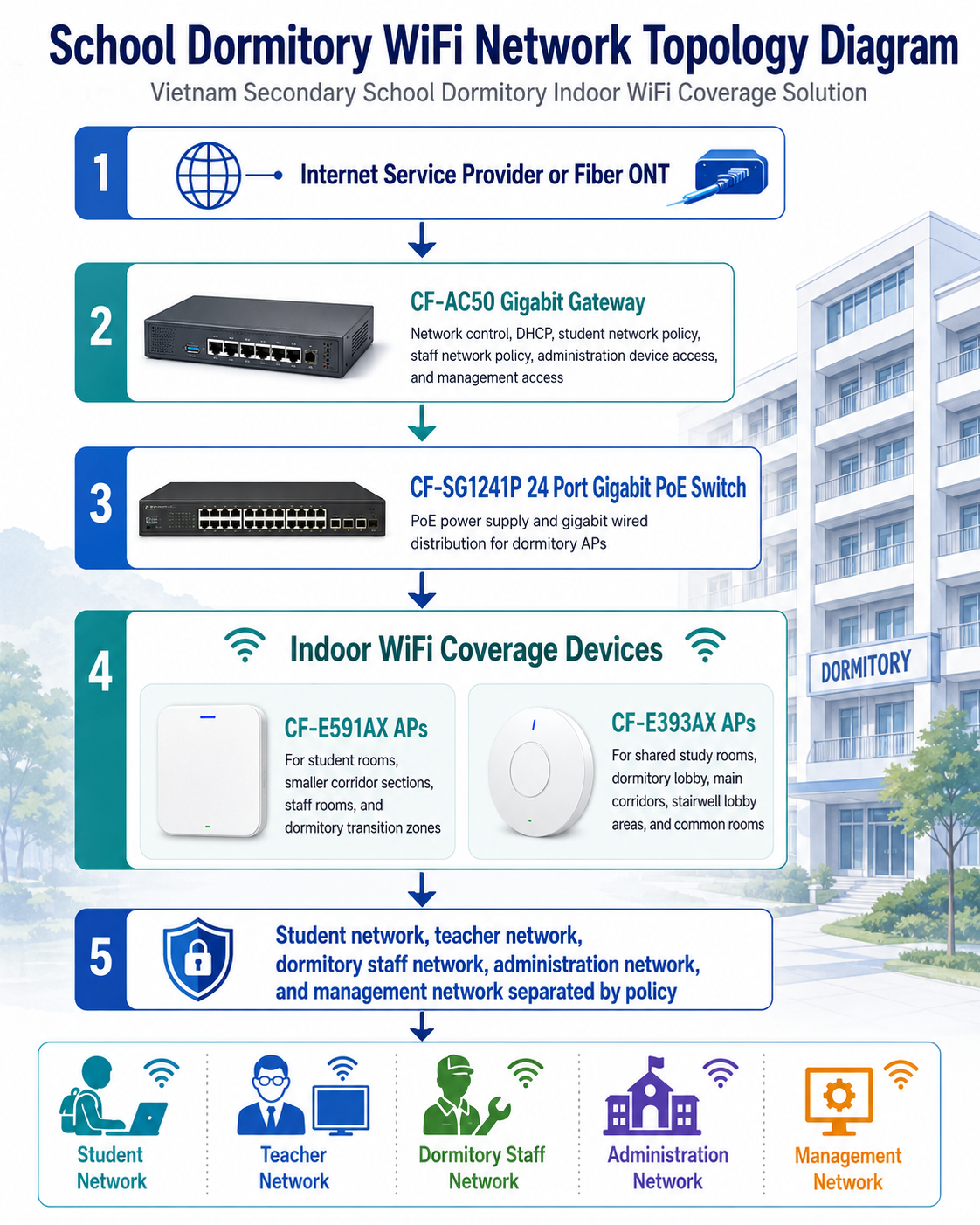
CF-AC50 Gigabit Gateway
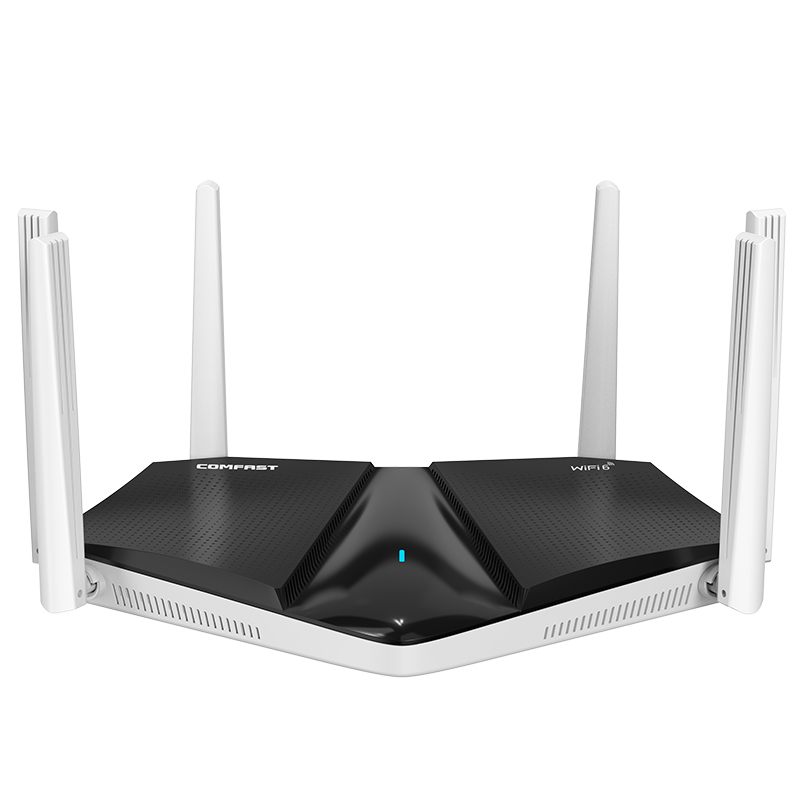
The CF-AC50 was used as the main gigabit gateway for the dormitory network. It handled internet access, DHCP assignment, student network policy, staff network policy, administration device access, and network management. For a school dormitory, the gateway is important because it allows the IT team to manage traffic more clearly instead of letting all devices share one uncontrolled network.
CF-SG1241P 24 Port Gigabit PoE Switch
The CF-SG1241P 24 port gigabit PoE switch was used as the main PoE distribution switch. It powered the access points and provided gigabit wired connections from the network room to each floor. Using PoE reduced the need for local power adapters, improved safety, and made the installation cleaner.
CF-E591AX WiFi 6 Dual Band AP
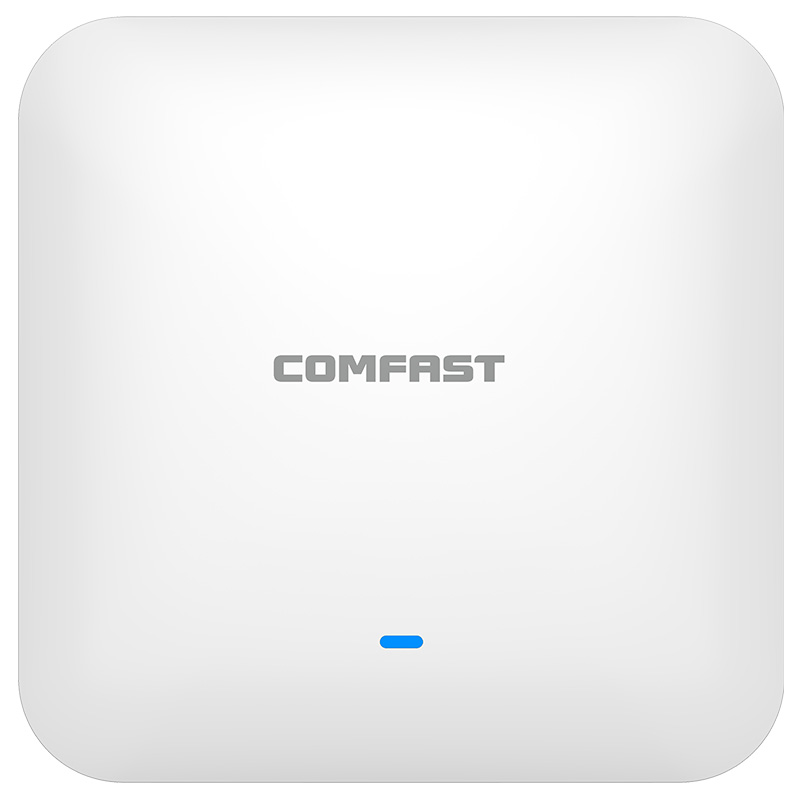
The CF-E591AX was used for student room zones, smaller corridor sections, staff rooms, and areas that needed practical WiFi 6 dual band coverage. Its 1500M WiFi 6 performance was suitable for room level and moderate density areas where stable access was more important than excessive transmit power.
CF-E393AX WiFi 6 Dual Band AP
The CF-E393AX was used in higher density areas such as shared study rooms, dormitory lobby, main corridors, and floor common areas. Its 3000M WiFi 6 dual band performance made it suitable for areas where multiple students connected with laptops, tablets, and phones at the same time.
5. Project Topology Diagram
Overall Network Topology
6. Site Survey and Troubleshooting Process
Floor by Floor RF Survey
We inspected all six floors and tested signal strength in corridors, rooms, study areas, stairwell entrances, laundry zones, and staff offices. We did not only test near the doors. We tested where students actually used the network, including beds, study desks, shared tables, and corner rooms.
Room Layout and Wall Material Inspection
The student rooms had concrete walls, tiled bathrooms, metal bed frames, cabinets, and several internal partitions. These materials affected the WiFi path. The survey confirmed that a corridor only AP design would not meet the school’s requirement for stable room coverage.
Corridor and Stairwell Analysis
The corridors were long and narrow. If APs were installed too far apart, there would be weak zones near the corridor ends. If APs were installed too close together, there would be unnecessary overlap and interference. We planned AP spacing based on measured signal, not on equal visual distance alone.
Shared Study Room Capacity Check
Shared study rooms required stronger capacity than ordinary corridor areas because students often used laptops and tablets there at the same time. We selected CF-E393AX APs for these rooms to support higher device density and better learning performance.
Network Room and Cable Route Inspection
The network room had old labels and mixed cable routing. We tested each cable route, confirmed floor destinations, relabeled patch points, and prepared a clean PoE distribution layout using the CF-SG1241P switch.
Evening Usage Pattern Review
We interviewed school staff and reviewed student usage patterns. The heaviest usage happened after dinner and during evening study hours. We designed the network with this peak period in mind instead of only testing during daytime when the building was quiet.
7. Problems Found During Implementation
The Original APs Were Too Few for the Dormitory Size
The old system used too few APs and expected corridor signals to penetrate multiple rooms. This created weak signal inside rooms and overloaded APs during evening peak usage. We increased AP coverage points and selected AP models based on area type.
Corridor Only Coverage Could Not Support Student Rooms
The previous design had acceptable signal near corridor doors but poor signal near desks and beds. We adjusted AP positions and added coverage in the right locations to improve room level experience. We also balanced AP power to avoid unnecessary interference.
Study Rooms Needed Higher Capacity Than Ordinary Rooms
The study rooms concentrated many active users. We used CF-E393AX APs in these spaces because they required higher performance and better support for multiple laptops and tablets.
Existing Cable Labels Were Not Reliable
Several existing cable labels did not match the actual destinations. Some cables were marked by old floor names, while others had no label at all. We tested and relabeled each cable before connecting APs to the PoE switch.
Student and Staff Devices Needed Separation
Student devices and staff devices had different security and performance requirements. We separated student access, teacher access, dormitory staff access, administration devices, and management access through network policy planning.
Transmit Power Had to Be Tuned Carefully
Maximum AP power was not the correct solution. In a dormitory with repeated room layouts and long corridors, excessive power creates overlap and sticky client behavior. We tuned power and channels floor by floor to improve roaming and reduce interference.
8. Final Engineering Solution
Core Gateway and Network Management
We installed the CF-AC50 as the main gigabit gateway. It provided DHCP service, basic policy control, student network management, staff network management, and administration access control. This gave the school a more organized network structure than the previous flat system.
PoE Switch Distribution
The CF-SG1241P 24 port gigabit PoE switch was installed in the network room. It powered the APs through Ethernet cables and provided centralized distribution to different floors. This improved safety and reduced the need for separate power adapters in corridors and rooms.
Student Room and Corridor Coverage
CF-E591AX APs were used for student room coverage zones and smaller corridor sections. We placed APs based on room layout, wall structure, and measured signal, not only on corridor symmetry. This improved the student experience at desks and beds, where WiFi was previously weak.
Study Room and Common Area Coverage
CF-E393AX APs were used in shared study rooms, the dormitory lobby, common rooms, and larger floor public areas. These areas had more active users and required stronger WiFi 6 performance.
Network Segmentation
We created separate access policies for student devices, teacher devices, dormitory staff, administration equipment, and network management. This improved security and made troubleshooting easier for the school IT team.
9. Different Area Network Design
Dormitory Lobby Coverage
The dormitory lobby was a public gathering area where students waited for friends, checked announcements, and used mobile devices. We used CF-E393AX coverage in this area because it needed stronger performance and better support for groups of users.
Student Room Coverage
Student rooms were the most important part of the project. We tested each floor layout and planned CF-E591AX AP placement so students could connect from study desks, beds, and room corners. The goal was to support daily learning, homework submission, and online communication without requiring students to move near the corridor door.
Main Corridor Coverage
Main corridors required stable roaming and coverage for students walking between rooms, stairwells, and study areas. AP power was tuned to reduce unnecessary overlap while maintaining continuous coverage.
Shared Study Room Coverage
Study rooms used CF-E393AX APs to support higher user density. We tested multiple laptops, phones, and tablets during acceptance to confirm that students could access online learning platforms and cloud based materials smoothly.
Staff Office Coverage
The staff office used a separated staff network for dormitory supervisors and school administration devices. This network was not mixed with student devices, which improved reliability and security.
Stairwell and Floor Transition Coverage
Stairwells and floor transition points needed enough coverage for roaming and staff communication. We did not oversaturate these areas with APs. Instead, we tuned nearby APs to maintain practical signal continuity.
Laundry and Service Area Coverage
Laundry and service areas did not need high capacity, but they still required basic connectivity for students and staff. CF-E591AX AP placement nearby provided stable enough access without overbuilding the area.
10. Network Segmentation and Access Policy Design
Student Network
The student network was designed for daily learning, homework, online class participation, school communication, and reasonable personal use. The school could apply bandwidth and access policies through the gateway according to its internal rules.
Teacher Network
The teacher network supported teacher laptops, tablets, and learning management access. It was separated from the student network to improve reliability and protect school resources.
Dormitory Staff Network
The dormitory staff network supported supervisors, attendance devices, maintenance reporting, and internal communication. It remained separate from student traffic.
Administration Network
The administration network was used for approved school office devices and management systems. It was protected from student and guest access.
Management Network
The management network was used for gateway, switch, and AP maintenance. Access was restricted to authorized technical staff only.
11. Installation and Optimization Details
Cable Testing and Relabeling
Before connecting the new devices, we tested all available cable routes. Each verified cable was labeled at both ends. The updated cable map was included in the handover document so the school IT team could identify each AP and floor connection quickly.
Network Cabinet Cleanup
We removed unnecessary old adapters, reorganized patch cables, installed the CF-AC50 gateway and CF-SG1241P PoE switch cleanly, and documented the port usage. The cabinet became easier to inspect and maintain.
AP Installation
CF-E591AX APs and CF-E393AX APs were installed according to the final RF plan. Mounting positions were selected for coverage value, student safety, appearance, and maintenance accessibility. APs were not installed randomly based only on available cable positions.
Channel Planning
Because each floor had similar room layouts, channel overlap could easily happen if APs were left with default settings. We adjusted channels floor by floor to reduce interference and improve stability.
Transmit Power Optimization
We tuned transmit power carefully. Excessive AP power could cause devices to stay connected to a distant AP. Correct power balance helped students move between rooms, corridors, and study areas more smoothly.
Evening Peak Simulation
We performed a controlled evening test with multiple student devices connected in rooms, corridors, and study areas. This test was important because daytime testing alone would not reflect real dormitory usage.
12. What We Did Differently from Ordinary Installation Teams
We Tested Real Student Positions
We did not only test the corridor. We tested beds, desks, room corners, study tables, lobby seating, and stairwell transition areas. This gave us a design based on real student use.
We Designed for Evening Load
Many installers test during the day when the dormitory is quiet. We planned for evening peak usage because that is when the dormitory network is under the most pressure.
We Did Not Use Maximum Power as a Shortcut
Maximum transmit power can create interference and poor roaming. We tuned power and channels carefully to create a more stable system.
We Separated Student and Staff Access
We did not leave all devices on one flat network. Student, teacher, dormitory staff, administration, and management access were planned separately to improve security and manageability.
We Delivered a Maintainable System
We organized the cabinet, labeled cables, recorded AP locations, and trained the school IT staff. The project was not only about turning on WiFi. It was about leaving behind a system that the school could operate confidently.
13. Project Acceptance Testing
Final Acceptance Checklist
Student room WiFi signal test passed.
Study desk and bed position coverage test passed.
Main corridor roaming test passed.
Shared study room high device test passed.
Dormitory lobby coverage test passed.
Staff office network access test passed.
Teacher network access test passed.
Student and staff network separation test passed.
DHCP and gateway policy test passed.
PoE switch stability test passed.
Evening peak usage simulation passed.
Network cabinet labeling completed.
AP location map, topology notes, and IT staff training completed.
14. Customer and User Feedback
School Principal Feedback
The school principal said, “The dormitory network is now much more stable and better organized. Students can study online from their rooms, and our staff have a separate network for management work.”
IT Staff Feedback
The school IT technician said, “The cabinet labeling and AP location records are very helpful. Before this project, it was difficult to know which cable went where. Now we can locate and troubleshoot devices much faster.”
Dormitory Supervisor Feedback
A dormitory supervisor said, “Student complaints about WiFi dropped significantly after the upgrade. The shared study rooms also work much better during evening study time.”
Teacher Feedback
A teacher said, “Students who live in the dormitory can now submit online assignments more reliably. Video learning sessions are much smoother than before.”
Student Feedback
Several students reported that WiFi was now usable from their desks and beds instead of only near the room door. They also noticed better performance in the study rooms and common areas.
15. Project Summary
Final Result
Project Mekong Learning Residence was a successful indoor WiFi coverage project for a secondary school dormitory building in Vietnam. The project solved weak room coverage, unstable evening performance, poor study room capacity, disorganized cabling, mixed network access, and limited IT maintainability.
The final COMFAST solution used the CF-AC50 gigabit gateway, CF-SG1241P 24 port gigabit PoE switch, CF-E591AX WiFi 6 dual band APs, and CF-E393AX WiFi 6 dual band APs. The system provided stronger room level coverage, better public area capacity, clean PoE distribution, and clearer network management.
The most important success of the project was not simply adding more APs. The real success was designing the network around how students actually live and study in the dormitory. Coverage was tested from desks, beds, corridors, study rooms, staff areas, and evening peak usage conditions.
16. Lessons Learned and Advice to Other Contractors
Lessons Learned
Dormitory WiFi must be designed around room level usage, not only corridor signal.
Evening peak usage is the real test for a student dormitory network.
Study rooms need stronger capacity planning than ordinary corridors.
Concrete walls, bathrooms, metal furniture, and long corridors must be considered during AP planning.
Student, teacher, staff, administration, and management access should not be mixed into one flat network.
PoE deployment improves safety and makes maintenance easier in education buildings.
Cable labels and handover documentation are as important as AP installation.
Advice to Other Contractors
For school dormitory WiFi projects, do not design only from a floor plan. Walk into the rooms. Sit at the student desks. Test near the beds. Check the bathrooms, doors, walls, stairwells, and study rooms. A dormitory network must work where students actually use it.
Do not rely on maximum AP power to solve coverage problems. Correct AP placement, channel planning, and power tuning will create a more stable network than simply increasing signal strength everywhere.
Do not ignore the school IT team. After the contractor leaves, the school must maintain the network. Clean cabinet organization, port labels, AP records, and basic training are part of professional project delivery.
A school dormitory WiFi project is complete only when students can study online from their rooms, teachers can support digital learning, dormitory staff can manage daily work, and the IT team can maintain the system with confidence. That was the standard we delivered for Project Mekong Learning Residence.