




















Project Qianhai Vision Office: Indoor WiFi Coverage for a Newly Relocated Enterprise Office Floor in Shenzhen
Contractor Team Introduction
We are a Shenzhen based WiFi engineering contractor with extensive experience in enterprise office WiFi coverage, hotel wireless systems, shopping mall WiFi, public service hall networks, scenic area wireless coverage, warehouse networks, outdoor bridge transmission, and managed commercial network deployment. Our team has served technology companies, cross border e commerce offices, design studios, financial service teams, manufacturing headquarters, shared office spaces, retail stores, hotels, and public institutions across Shenzhen and the Greater Bay Area.
For office WiFi projects, we do not simply install access points and leave. A newly relocated company needs stable wireless coverage before employees move in, before printers are connected, before meeting rooms are used, before video conferences start, and before daily work depends on the network. Our engineering work includes site survey, RF planning, cable inspection, gateway configuration, AP placement, PoE switch deployment, roaming testing, meeting room optimization, department area coverage planning, guest network separation, printer and IoT device access planning, speed testing, acceptance testing, and final handover documentation.
We have used COMFAST equipment in many real office and commercial WiFi projects. From our field experience, COMFAST routers, gateways, WiFi 7 ceiling APs, OpenWrt mini routers, and PoE switches are practical for office environments because they provide flexible deployment, easy maintenance, clean installation, and good performance for small and medium enterprise networks. In this project, we selected COMFAST equipment because the customer required a compact but stable solution for a full floor office, with strong wireless coverage, simple network control, and flexible expansion for special office scenarios.
This case study documents our indoor WiFi coverage project for a Shenzhen enterprise that had just moved into a new office floor. The project required fast deployment, clean cabling, stable WiFi 7 coverage in open office areas, reliable meeting room connectivity, a simple gateway structure, PoE powered AP installation, and a dedicated mini router solution for temporary testing and USB based extension needs.
1. Project Overview
Basic Project Information
Project Name: Project Qianhai Vision Office
Project Location: Nanshan District, Shenzhen, China
Customer Type: Technology and cross border e commerce enterprise
Office Type: One full floor enterprise office
Office Area: Approximately 1,480 square meters
Employee Capacity: Around 120 fixed workstations with expansion space for 160 users
Main Coverage Areas: Reception, open office area, executive office, finance office, HR office, meeting rooms, training room, product display area, pantry, printer zone, server cabinet area, temporary testing desk, and guest waiting area
Project Type: Full floor indoor WiFi coverage for a newly relocated company
Project Cycle: 10 working days from site survey to acceptance testing
Deployment Window: Before employee move in, during final office decoration and furniture installation stage
The customer was moving into a newly renovated office floor in Shenzhen. The company planned to start normal operation immediately after furniture installation, so the WiFi system had to be completed before the employees entered the office. This type of project is common in Shenzhen, but it is also easy to underestimate. New company relocation projects are time sensitive, and the network must be ready before computers, printers, meeting room systems, HR devices, visitors, and daily office workflows are fully active.
2. Customer Pain Points Before the Project
The Office Had No Completed Wireless Design Before Move In
The office renovation team had prepared some network cable points, but there was no complete wireless coverage design. The customer originally expected that a few routers could cover the floor, but after our first site inspection, we confirmed that this approach would not support real office usage. The floor had glass partitions, meeting rooms, ceiling structures, dense workstations, and multiple functional zones that required professional AP planning.
Meeting Rooms Required Stable Video Conference Performance
The company frequently held online meetings with overseas suppliers, customers, logistics partners, and branch teams. Meeting room WiFi stability was a core requirement. The previous office had experienced video freezing, screen sharing delay, and unstable wireless connections during important calls. The new office needed to avoid these problems from day one.
Open Office Area Had Dense User Devices
Each employee normally used at least one laptop and one mobile phone. Some departments also used tablets, barcode scanners, sample testing devices, wireless printers, and smart display devices. During working hours, the number of connected devices could easily exceed the number of employees. The wireless system needed enough capacity, not only visible signal.
Glass Partitions and Office Rooms Created Signal Barriers
The new office used many glass partitions, aluminum frames, wood panels, and acoustic materials. These materials made the office look modern, but they also changed signal behavior. Some enclosed meeting rooms and executive rooms would not receive reliable signal if we only placed APs in the open office ceiling.
Network Cable Labels Were Not Fully Accurate
During inspection, we found several cable labels that did not match the actual outlet locations. This is a common issue during new office renovation because multiple teams work at the same time. If we had trusted the labels directly, APs could have been connected to the wrong switch ports and troubleshooting would have taken much longer.
Guest WiFi Needed to Be Separated from Internal Office Devices
The office had a reception area and a product display zone where suppliers, interview candidates, and visitors would connect to WiFi. The customer needed a guest WiFi network, but visitor devices could not access internal office computers, printers, or management devices.
The Customer Needed a Flexible Temporary Test Network
Before full move in, the company needed a temporary network for IT testing, printer setup, sample device checking, and USB based extension scenarios. A compact OpenWrt device with USB expansion capability was useful for this stage, especially when IT staff needed a small isolated network for testing without affecting the official office network.
3. Customer Requirements
Confirmed Requirements from the Enterprise IT Team
Stable WiFi coverage across the entire office floor.
Strong WiFi 7 coverage in open office areas and meeting rooms.
Reliable wireless performance for video conferencing and screen sharing.
Clean AP installation without affecting office design or ceiling appearance.
Separate office staff network, guest network, meeting room device network, printer and IoT device network, and management access.
Centralized gateway control with simple IP assignment and access management.
PoE powered AP deployment to avoid separate power adapters near AP locations.
Flexible OpenWrt mini router deployment for testing and USB extension scenarios.
Stable roaming between reception, open office, meeting rooms, and pantry area.
Clear network cabinet labeling, AP location records, and handover documentation.
Completion before employee move in and official office opening.
4. COMFAST Equipment Used in This Project
CF-RG215 Full Gigabit Mini Gateway
The CF-RG215 was used as the main gateway for the office network. It provided full gigabit access, basic network control, DHCP assignment, office network policy, guest network separation, printer and IoT device access planning, and management access. For a one floor office, this compact gateway was suitable because the customer needed stable access control without overcomplicating the network structure.
CF-SF181P 8 Port Fast Ethernet PoE Switch
The CF-SF181P 8 port PoE switch was used to power and connect the ceiling APs and selected low traffic network devices. In this project, it was placed in the office network cabinet to simplify AP power delivery and reduce the need for separate power adapters. We designed the connection plan carefully so the PoE switch handled AP power and stable office area distribution within the customer’s budget and device requirement.
CF-E373BE WiFi 7 Ceiling AP
The CF-E373BE WiFi 7 ceiling AP was used as the main wireless coverage device for open office areas, meeting rooms, the training room, reception, product display area, and pantry transition zone. Its 3600M WiFi 7 performance made it suitable for modern office environments where employees use multiple devices and expect stable wireless access.
CF-WR632AX OpenWrt Mini Router with USB Expansion
The CF-WR632AX was used for temporary testing, isolated device setup, USB expansion scenarios, and special IT desk access. Its OpenWrt flexibility made it useful for the customer’s IT team during move in preparation. The USB port also provided expansion possibilities for testing, temporary storage access, or specific office device integration according to the IT team’s internal needs.
5. Project Topology Diagram
Overall Network Topology
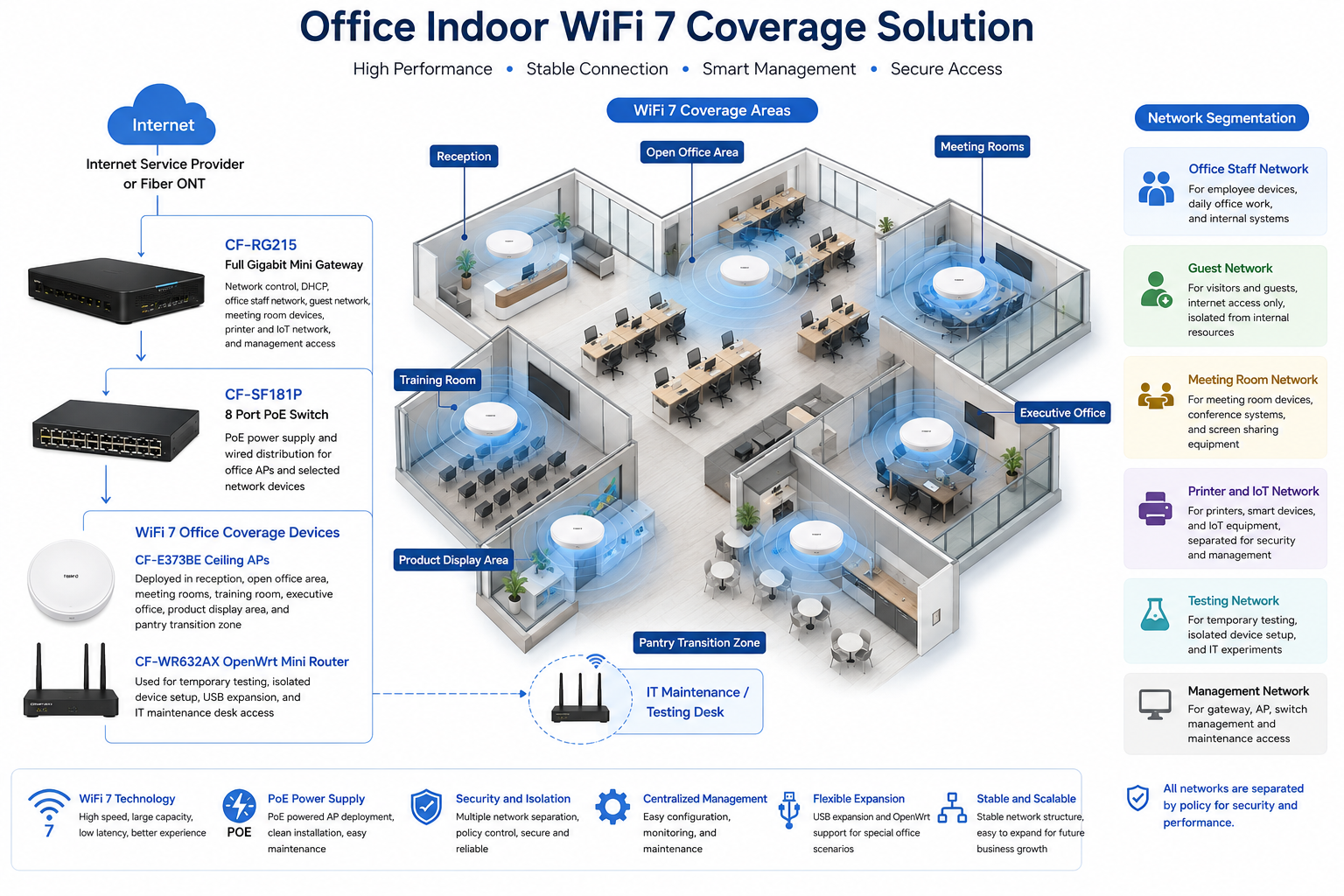
6. Site Survey and Troubleshooting Process
Full Floor Walkthrough
Before installation, our team walked through the entire office floor with the customer’s IT representative and decoration supervisor. We checked reception, workstation zones, meeting rooms, training room, executive office, finance office, HR room, pantry, printer area, and equipment cabinet. We marked the areas that needed strong capacity and the areas that only needed stable basic access.
Ceiling and Partition Inspection
The office had suspended ceilings, aluminum ceiling frames, glass partitions, acoustic panels, and decorative lighting. We inspected ceiling access points and avoided AP mounting positions too close to large metal frames, air conditioning vents, lighting tracks, and decorative panels. This helped reduce reflection and coverage imbalance.
Meeting Room Signal Testing
Meeting rooms were tested carefully because they had glass walls, doors, TV screens, conference cameras, and audio devices. We checked signal from the conference table, display wall, door side, and room corners. The final AP plan gave meeting rooms stable coverage for video calls and screen sharing.
Open Office Capacity Review
The open office area had the largest number of users. We reviewed desk layout, department distribution, expected device count, and future expansion seats. WiFi planning was based on the number of connected devices, not only on office square meters.
Cable Verification
All available network cable routes were tested before AP installation. Several labels were inaccurate, so we corrected them and updated the port map. This step prevented wrong AP connections and reduced later troubleshooting time.
Network Cabinet Inspection
The network cabinet was still being finalized during office renovation. We checked power availability, device placement, ventilation, patch panel position, cable entry direction, and space for the gateway and PoE switch. We also confirmed that the cabinet layout would be maintainable after the customer moved in.
Temporary IT Testing Requirement Review
The IT team needed a temporary isolated testing environment before the official office network was fully released. We planned the CF-WR632AX OpenWrt mini router for this purpose, allowing IT staff to test devices and USB based extension scenarios without affecting the main staff network.
7. Problems Found During Implementation
The Original Cable Plan Did Not Match the Final Office Layout
During renovation, some desks, partitions, and meeting room locations were adjusted. As a result, several original network points were no longer ideal for AP placement. We revised AP locations based on the final furniture layout instead of blindly following the early construction drawing.
Glass Meeting Rooms Could Not Rely Only on Open Office APs
The glass walls and conference equipment inside meeting rooms changed the wireless environment. If we relied only on APs in the open office ceiling, some meeting room seats would receive weaker performance. We planned AP coverage so meeting rooms had reliable signal for real video conference usage.
APs Could Not Be Installed Too Close to Lighting and Air Conditioning Structures
The ceiling had linear lights, air outlets, metal frames, and sprinkler positions. Some visually convenient AP points were not good RF positions. We coordinated with the decoration team and selected mounting points that balanced signal performance, appearance, and building safety requirements.
A Simple Router Based Solution Would Not Support the Office Properly
The customer initially considered using several independent routers. We explained that this would create SSID confusion, roaming problems, unmanaged traffic, and poor troubleshooting. A gateway plus PoE AP structure was more suitable for a professional office.
Guest Access Needed Clear Isolation
The company often received suppliers and interview candidates. Guest devices could not share the same access policy as staff laptops, printers, and internal devices. We separated the guest network through the gateway policy.
Fast Move In Schedule Required Tight Coordination
The WiFi project overlapped with furniture delivery, cleaning, power testing, and meeting room equipment installation. We coordinated installation time with the project manager so AP mounting, cabinet work, and testing did not delay the company’s move in schedule.
8. Final Engineering Solution
Core Gateway Design
The CF-RG215 full gigabit mini gateway was installed as the central gateway. It provided office network control, DHCP service, guest access separation, printer and IoT device policy, meeting room device support, and management access. The compact size also helped keep the network cabinet clean.
PoE Switch Deployment
The CF-SF181P 8 port PoE switch was used to provide PoE power and wired distribution for the APs. This avoided placing power adapters in the ceiling and made future AP maintenance easier. Each AP connection was labeled on the patch map.
WiFi 7 Ceiling AP Coverage
CF-E373BE WiFi 7 ceiling APs were installed in the open office area, meeting room zone, reception, training room, product display area, and pantry transition area. The AP layout was designed to support daily office work, video meetings, visitor access, and employee mobility.
OpenWrt Mini Router Testing Zone
The CF-WR632AX OpenWrt mini router was used at the IT testing desk. It provided a flexible small network for temporary device setup, sample device testing, USB extension testing, and isolated troubleshooting. This was especially useful before the full office network was released to all employees.
Network Segmentation
We separated the office staff network, guest network, meeting room device network, printer and IoT network, temporary testing network, and management network. This improved security, reduced unnecessary traffic, and made future troubleshooting easier.
9. Different Area Network Design
Reception and Guest Waiting Area Coverage
The reception area required stable guest WiFi and a professional first impression. CF-E373BE ceiling AP coverage was adjusted so visitors could connect easily while remaining isolated from internal office devices.
Open Office Area Coverage
The open office area had the highest employee density. We used WiFi 7 ceiling APs to support laptops, mobile phones, tablets, and internal collaboration tools. AP placement was based on workstation density and expected device count.
Meeting Room Coverage
Meeting rooms were designed as priority spaces. We tested video conference devices, laptops, wireless screen sharing, and mobile phones from actual seating positions. Coverage was tuned to support stable communication with remote teams and overseas partners.
Training Room Coverage
The training room could host internal training, supplier presentations, and new employee onboarding. Since many users may connect at the same time, we provided stronger AP coverage and tested multiple device connections during acceptance.
Executive and Finance Office Coverage
Executive and finance offices required stable access but also controlled network policy. These areas were tested separately because glass partitions and doors affected signal. Network access was kept separate from guest WiFi.
Product Display Area Coverage
The product display area was used for customer demonstrations and supplier visits. We ensured guest WiFi and internal demo devices could work smoothly without exposing internal office resources.
Printer and IoT Device Zone
Office printers, display devices, and selected smart office devices were placed on a separate printer and IoT network policy. This helped reduce unnecessary exposure to guest devices and made device management easier.
IT Testing Desk Coverage
The IT testing desk used the CF-WR632AX OpenWrt mini router. It supported temporary isolated testing, USB extension scenarios, sample device checks, and troubleshooting work before official office launch.
10. Network Segmentation and Access Policy Design
Office Staff Network
The office staff network was used by employee laptops, phones, and daily work devices. It supported collaboration tools, cloud platforms, internal systems, and normal office communication.
Guest Network
The guest network was used by visitors, suppliers, interview candidates, and temporary guests. It was separated from internal office resources and provided controlled internet access only.
Meeting Room Device Network
Meeting room devices, conference systems, and selected screen sharing equipment were planned separately so they could remain stable during important calls and presentations.
Printer and IoT Network
Printers, display devices, and smart office devices were separated from guest access and normal mobile traffic. This improved security and made support easier for the IT team.
Temporary Testing Network
The temporary testing network was handled through the CF-WR632AX OpenWrt mini router. It was used for device testing, isolated troubleshooting, and USB extension experiments before official launch.
Management Network
The management network was reserved for gateway, AP, switch, and maintenance access. It was restricted to authorized IT and engineering staff.
11. Installation and Optimization Details
Cable Testing and Relabeling
Before connecting equipment, we tested every cable route available for AP installation. Each confirmed cable was relabeled at both the cabinet side and outlet side. The updated cable map was included in the final handover document.
Network Cabinet Organization
We installed the CF-RG215 gateway and CF-SF181P PoE switch in the cabinet, organized patch cables, confirmed power supply, and labeled AP ports. A clean network cabinet is not just for appearance. It directly affects future troubleshooting efficiency.
AP Mounting
CF-E373BE ceiling APs were mounted in planned locations. We avoided placing APs too close to large metal structures, air conditioning outlets, lamps, and decorative panels. Each AP was checked for appearance, stability, and coverage value.
SSID Planning
We recommended a simple SSID structure to avoid unnecessary wireless overhead. The final SSID plan included office staff access, guest access, meeting room device access, testing access, and management access. We advised the customer not to create too many SSIDs because too many public SSIDs can reduce wireless efficiency.
Channel and Power Optimization
After AP installation, we tuned channels and transmit power. Maximum power was not used by default because it can create sticky client behavior and AP overlap. Correct power control helped devices move more naturally between open office areas, meeting rooms, and public zones.
Video Meeting Testing
We tested video calls, screen sharing, cloud document access, and wireless device movement in meeting rooms and the open office area. These tests were performed from actual seating positions instead of only standing near APs.
OpenWrt Testing Router Setup
The CF-WR632AX was configured for IT testing needs. We documented how it was connected, what it was used for, and how the IT team could isolate or disable it when the testing stage ended.
12. What We Did Differently from Ordinary Installation Teams
We Designed Around the Move In Schedule
New office relocation projects require timing control. We coordinated with the decoration team, furniture team, meeting room equipment vendor, and customer IT team so that network installation did not delay office opening.
We Tested Real Work Scenarios
We did not only check signal bars. We tested video conferencing, laptop access, phone roaming, guest connection, printer access, screen sharing, and IT device testing scenarios.
We Avoided Independent Router Chaos
Some installers solve office coverage by placing several independent routers. This creates inconsistent SSIDs, roaming problems, and difficult maintenance. We used a gateway plus AP structure for a cleaner and more professional network.
We Provided a Dedicated Temporary Testing Method
The CF-WR632AX OpenWrt mini router gave the IT team a flexible testing environment. This allowed pre move in device preparation without disturbing the official office network.
We Delivered Handover Documentation
The customer received AP location records, cable labels, port mapping, network group notes, SSID notes, and basic troubleshooting guidance. This made the network maintainable after our team left the site.
13. Project Acceptance Testing
Final Acceptance Checklist
Reception WiFi coverage test passed.
Open office area coverage test passed.
Meeting room video conference test passed.
Training room multi device test passed.
Executive office signal test passed.
Guest WiFi isolation test passed.
Printer and IoT network access test passed.
Office staff network access test passed.
Roaming test between open office and meeting rooms passed.
CF-WR632AX temporary testing network test passed.
PoE switch AP power stability test passed.
Network cabinet labeling completed.
AP location map, port map, topology notes, and IT handover completed.
14. Customer and User Feedback
IT Manager Feedback
The customer’s IT manager said, “The WiFi system was ready before our staff moved in, and the documentation was very clear. The AP location map and port labels make future maintenance much easier.”
Operations Manager Feedback
The operations manager said, “Our first week in the new office was smooth. Employees could connect immediately, meeting rooms worked well, and visitors had separate guest WiFi.”
Meeting Room User Feedback
Several department leaders reported that video calls and screen sharing worked steadily in the meeting rooms. This was one of the most important acceptance results for the customer because overseas communication was part of their daily workflow.
Employee Feedback
Employees reported that WiFi was stable in the open office, pantry, training room, and product display zone. They did not need to manually switch between different router names while moving around the office.
Visitor Feedback
Visitors in the reception and product display areas could connect to guest WiFi easily. The guest network provided internet access without exposing the company’s internal devices.
15. Project Summary
Final Result
Project Qianhai Vision Office was a successful indoor WiFi coverage project for a newly relocated enterprise office floor in Shenzhen. The project solved pre move in wireless planning, meeting room stability, open office capacity, guest isolation, cable label correction, PoE AP deployment, and IT testing requirements.
The final COMFAST solution used the CF-RG215 full gigabit mini gateway, CF-SF181P 8 port PoE switch, CF-E373BE WiFi 7 ceiling APs, and CF-WR632AX OpenWrt mini router. This combination provided stable office coverage, flexible testing capability, clean installation, and manageable network structure.
The most important success of the project was completing the network before the company officially moved in. The office could start work immediately, meeting rooms were ready, guest WiFi was prepared, and the IT team received a clear handover package.
16. Lessons Learned and Advice to Other Contractors
Lessons Learned
New office WiFi must be completed before employee move in, not after problems appear.
Meeting rooms should be treated as priority coverage zones because video conferences are business critical.
Open office coverage must be designed around device count, not only floor area.
Glass partitions, aluminum frames, and decorative ceilings must be considered during AP planning.
Cable labels should always be tested instead of trusted blindly.
Guest WiFi, staff WiFi, printer devices, testing networks, and management access should be separated by policy.
A temporary testing router can be very useful during office relocation and IT setup.
Handover documentation is part of professional engineering, not an optional extra.
Advice to Other WiFi Engineering Contractors
For new office WiFi projects, do not wait until employees complain. Survey before move in, check the final layout, test cable labels, confirm meeting room needs, review user density, and coordinate with the decoration schedule. Office WiFi should be part of the move in plan, not a repair job after opening.
Do not solve office coverage by placing several independent routers. That method creates poor roaming, confusing SSIDs, unmanaged access, and difficult maintenance. A gateway plus AP structure is more professional and easier for the customer to operate.
Do not use maximum AP power as a shortcut. Correct AP position, channel planning, and power tuning provide a better experience than simply increasing signal everywhere.
A new company office WiFi project is complete only when employees can work from day one, meeting rooms can support video calls, guests can access a separated network, printers and office devices remain stable, and the IT team can maintain the system confidently. That was the standard we delivered for Project Qianhai Vision Office.