Project BayTech Manufacturing Campus: Indoor and Outdoor WiFi Coverage Solution for a Factory Park in Shenzhen
Contractor Team Introduction
We are a Shenzhen-based WiFi engineering contractor with deep experience in factory park WiFi coverage, warehouse wireless systems, office WiFi, hotel WiFi, shopping mall WiFi, scenic area WiFi, dock WiFi, government service WiFi, outdoor surveillance transmission, and industrial campus network deployment. Our team has delivered wireless projects for electronics factories, smart manufacturing parks, logistics centers, industrial warehouses, staff dormitories, production offices, security posts, outdoor yards, and remote CCTV monitoring points.
A factory campus WiFi project is not a simple office WiFi extension. It must support office staff, production supervisors, handheld terminals, warehouse scanning devices, meeting rooms, staff dormitory areas, factory roads, outdoor loading zones, visitor reception, security booths, CCTV cameras, and remote monitoring points. The real challenge is the mixed environment: reinforced concrete buildings, metal partitions, production machines, warehouse racks, moving forklifts, outdoor roads, high-density office areas, and strict network isolation requirements.
We have used COMFAST equipment in many factory, warehouse, office, outdoor, and security transmission projects. From our field experience, COMFAST gateways, PoE switches, ceiling APs, in-wall APs, outdoor WiFi 7 APs, and 5.8G wireless bridges provide a practical balance of stable performance, deployment flexibility, clean installation, centralized power, and easy maintenance. For this Shenzhen factory park project, we selected COMFAST CF-AC200 full gigabit core gateway, CF-SG1241P 24-port gigabit PoE switch, CF-E395AX WiFi 6 ceiling APs, CF-E591AX WiFi 6 in-wall APs, CF-WA973 outdoor WiFi 7 APs, CF-WA971 outdoor WiFi 7 APs, and CF-E319A V2 5.8G wireless bridges.
This case study documents our indoor and outdoor integrated WiFi coverage project for BayTech Manufacturing Campus in Shenzhen. The project covered the administration office, R&D office, meeting rooms, production workshop, SMT workshop, warehouse aisles, loading dock, outdoor factory roads, staff canteen exterior, dormitory entrance, visitor reception, security booth, parking area, material yard, perimeter fence cameras, and remote CCTV monitoring points.
1. Project Overview
Basic Project Information
Project Name: Project BayTech Manufacturing Campus
Project Location: Guangming District, Shenzhen, China
Site Type: Integrated factory campus with office building, production workshops, warehouse, outdoor roads, staff facilities, and security monitoring points
Total Campus Area: Approximately 68,000 square meters
Indoor Coverage Area: Approximately 31,000 square meters
Outdoor Coverage Area: Approximately 37,000 square meters
Main Buildings: Administration office building, R&D center, production workshop, SMT workshop, warehouse, canteen, dormitory entrance area, and security office
Main Outdoor Areas: Factory main road, loading dock, material yard, parking area, visitor entrance, staff walkway, canteen exterior, perimeter fence, and remote CCTV locations
Project Type: Indoor and outdoor integrated factory campus WiFi coverage with network segmentation and CCTV wireless transmission
Project Cycle: Six weeks from site survey to final acceptance
Construction Window: Night shifts, lunch breaks, weekend maintenance periods, and phased low-production windows to avoid affecting manufacturing operations
BayTech Manufacturing Campus was expanding production capacity and upgrading internal digital management. The customer needed WiFi coverage not only for office employees but also for production supervisors, warehouse scanning devices, mobile inspection terminals, visitors, security cameras, and outdoor patrol teams. The previous network had grown piece by piece over several years and could no longer support a modern factory park with mixed indoor and outdoor requirements.
2. Customer Pain Points Before the Project
Office WiFi Was Stable, but Workshop and Warehouse WiFi Was Uneven
The administration office had acceptable WiFi, but the production workshop and warehouse areas had uneven coverage. Some aisles had strong signal, while other sections near machines, racks, and thick walls had weak or unstable connectivity. Supervisors and warehouse operators often had to move closer to the office side to upload data reliably.
Metal Machines and Warehouse Racks Created Signal Problems
The production floor included metal equipment, test benches, SMT machines, electrical cabinets, and metal partitions. The warehouse had tall racks, pallet stacks, and moving forklifts. These elements caused reflection, attenuation, and dead zones. The old AP layout did not account for the actual RF behavior inside the factory.
Warehouse Scanning Devices Dropped Near Loading Docks
Warehouse staff used handheld scanners and PDA terminals for inbound receiving, inventory movement, and outbound loading. The most frequent dropouts happened near loading dock doors and transition areas between the warehouse interior and outdoor vehicle lanes.
Outdoor Factory Roads Had Weak WiFi
Outdoor roads, parking areas, material yards, and staff walkways had little usable WiFi. Security patrol teams, maintenance staff, logistics coordinators, and outdoor supervisors needed stable access, especially near the loading area and factory entrance.
Remote CCTV Cameras Were Difficult to Cable
Several remote CCTV cameras at the perimeter fence, parking edge, material yard, and back service road were far from the nearest switch cabinet. Pulling new cable would require long outdoor routes, trenching, or crossing active logistics lanes. The customer needed a stable wireless bridge transmission solution.
Visitor WiFi Was Mixed with Internal Office Access
Visitors, contractors, and interview candidates were sometimes connected to the same basic wireless environment used by internal staff. This was not suitable for a factory with R&D data, office systems, production devices, and security monitoring.
Production Device Traffic Was Not Clearly Separated
The original network did not clearly separate office staff devices, production terminals, warehouse scanners, guest WiFi, CCTV cameras, and management access. When a problem occurred, the IT team had difficulty identifying whether it was caused by wireless signal, device load, VLAN design, or a camera stream.
Previous Installations Were Not Easy to Maintain
Some APs were installed without clear labels. Some switch ports were not documented. Several cable routes were hard to trace. The customer wanted a professional handover with device labels, AP location records, port maps, and topology documentation.
3. Customer Requirements
Confirmed Requirements from Factory Management
Stable indoor WiFi coverage for office areas, meeting rooms, production workshops, SMT workshop, warehouse aisles, loading dock transition areas, and staff public areas.
Stable outdoor WiFi coverage for factory roads, material yard, parking area, loading area, staff walkway, security booth, visitor entrance, and canteen exterior.
Reliable wireless access for production supervisors, warehouse scanners, PDA terminals, maintenance tablets, and inspection devices.
Remote CCTV wireless transmission for perimeter cameras, material yard cameras, parking cameras, and back service road cameras.
Separate office staff network, production operation network, warehouse device network, guest WiFi network, CCTV network, and management network.
Centralized PoE power supply for APs and wireless bridge devices.
Outdoor APs suitable for rain, sun exposure, dust, heat, and long-term factory park use.
Clean installation without affecting production safety, factory appearance, logistics movement, or fire exits.
Clear handover documentation, including topology diagram, AP locations, switch port labels, bridge link records, and basic troubleshooting guidance.
4. COMFAST Equipment Used in This Project
CF-AC200 Full Gigabit Core Gateway
The CF-AC200 was used as the full gigabit core gateway for the factory campus network. It handled network control, DHCP, office staff network policy, production operation network policy, warehouse device network policy, guest WiFi policy, CCTV network planning, and management access. The gateway helped the IT team move away from a flat and difficult-to-manage network structure.
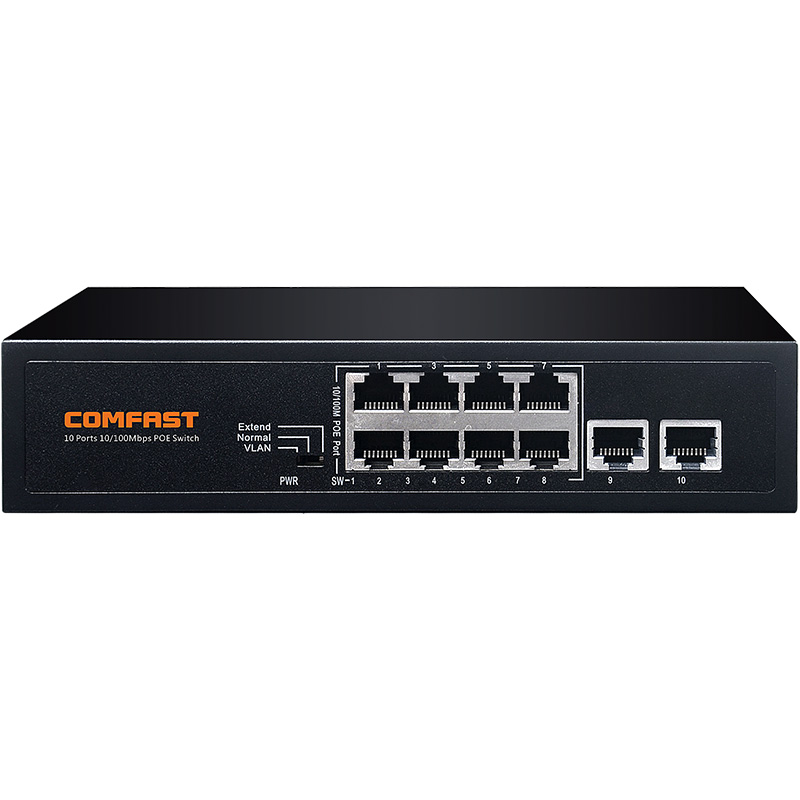
CF-SG1241P 24 Port Gigabit PoE Switch
The CF-SG1241P 24 port gigabit PoE switch was used as the main PoE distribution device. It provided centralized power and gigabit wired access for ceiling APs, in-wall APs, outdoor APs, wireless bridges, and selected monitoring devices. The 24-port capacity also allowed the factory to reserve ports for future cameras and additional production areas.
CF-E395AX WiFi 6 Ceiling AP
The CF-E395AX ceiling AP was used in open office areas, meeting rooms, production workshops, SMT workshop aisles, warehouse aisles, inspection areas, training rooms, and indoor loading transition zones. It provided stable indoor WiFi coverage for staff devices, warehouse terminals, and production management devices.
CF-E591AX WiFi 6 In-Wall AP
The CF-E591AX in-wall AP was deployed in office rooms, meeting rooms, supervisor rooms, security office, reception rooms, small training rooms, staff rest areas, and dormitory entrance management points. It provided focused room-level coverage where ceiling AP installation was not the best option.
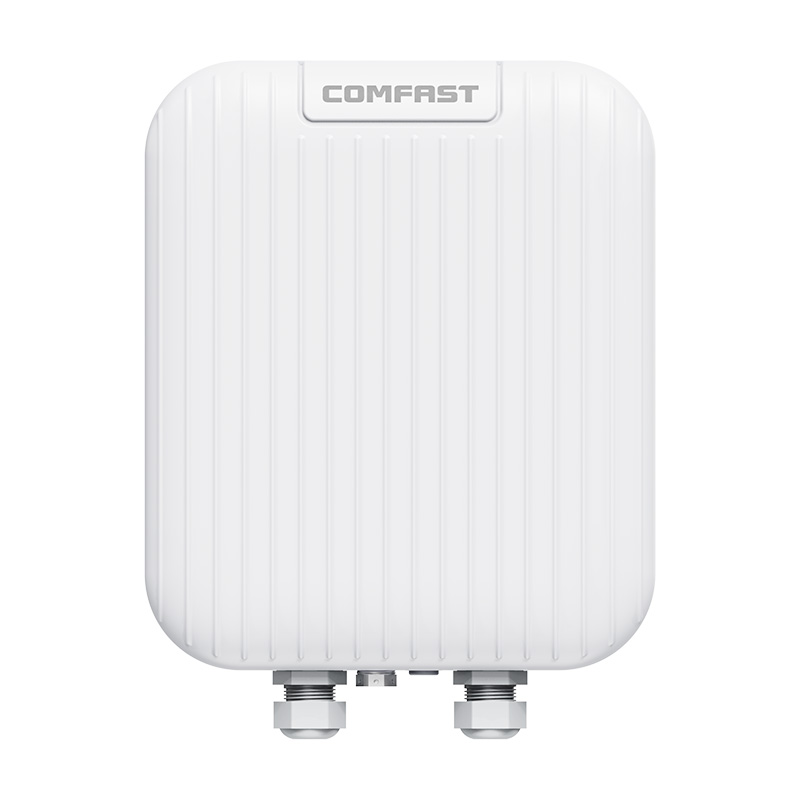
CF-WA973 Outdoor WiFi 7 AP
The CF-WA973 outdoor WiFi 7 AP was used for high-traffic outdoor areas, including the main factory road, loading dock exterior, material yard, parking area, visitor entrance, canteen exterior, and main staff walkway. These areas needed stronger outdoor performance and better capacity support.
CF-WA971 Outdoor WiFi 7 AP
The CF-WA971 outdoor WiFi 7 AP was used for focused outdoor coverage in the secondary factory road, security booth, back service route, dormitory entrance, smaller outdoor corners, equipment maintenance area, and lower-density outdoor work zones. It helped improve continuity between main outdoor AP coverage areas.
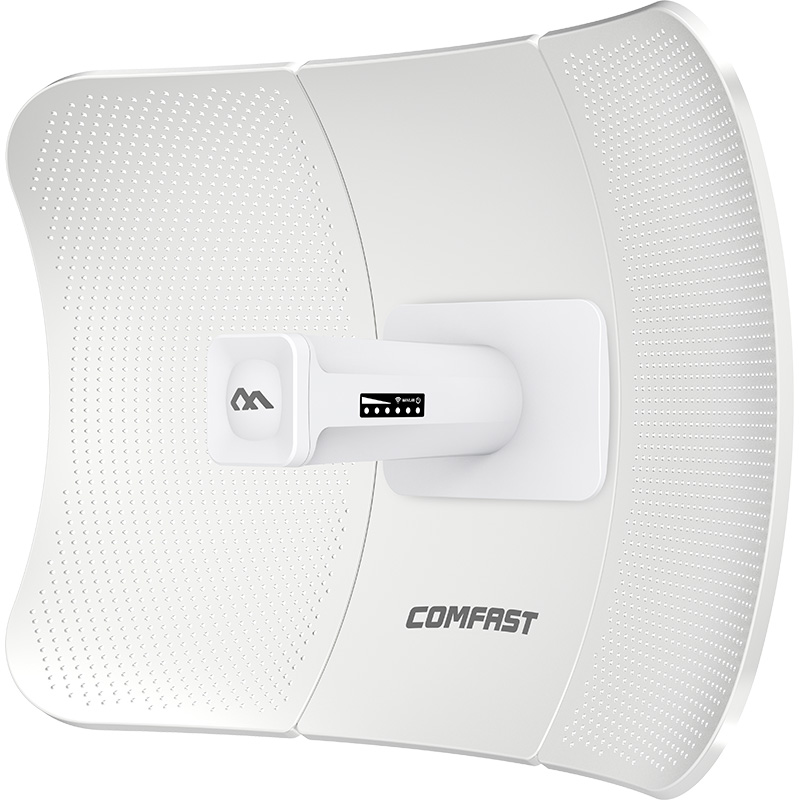
CF-E319A V2 5.8G Wireless Bridge
The CF-E319A V2 wireless bridge was used for 5.8G CCTV wireless transmission. It connected perimeter fence cameras, parking edge cameras, material yard cameras, back service road cameras, and remote monitoring points where cabling was difficult or disruptive.
5. Project Topology Diagram
Overall Network Topology
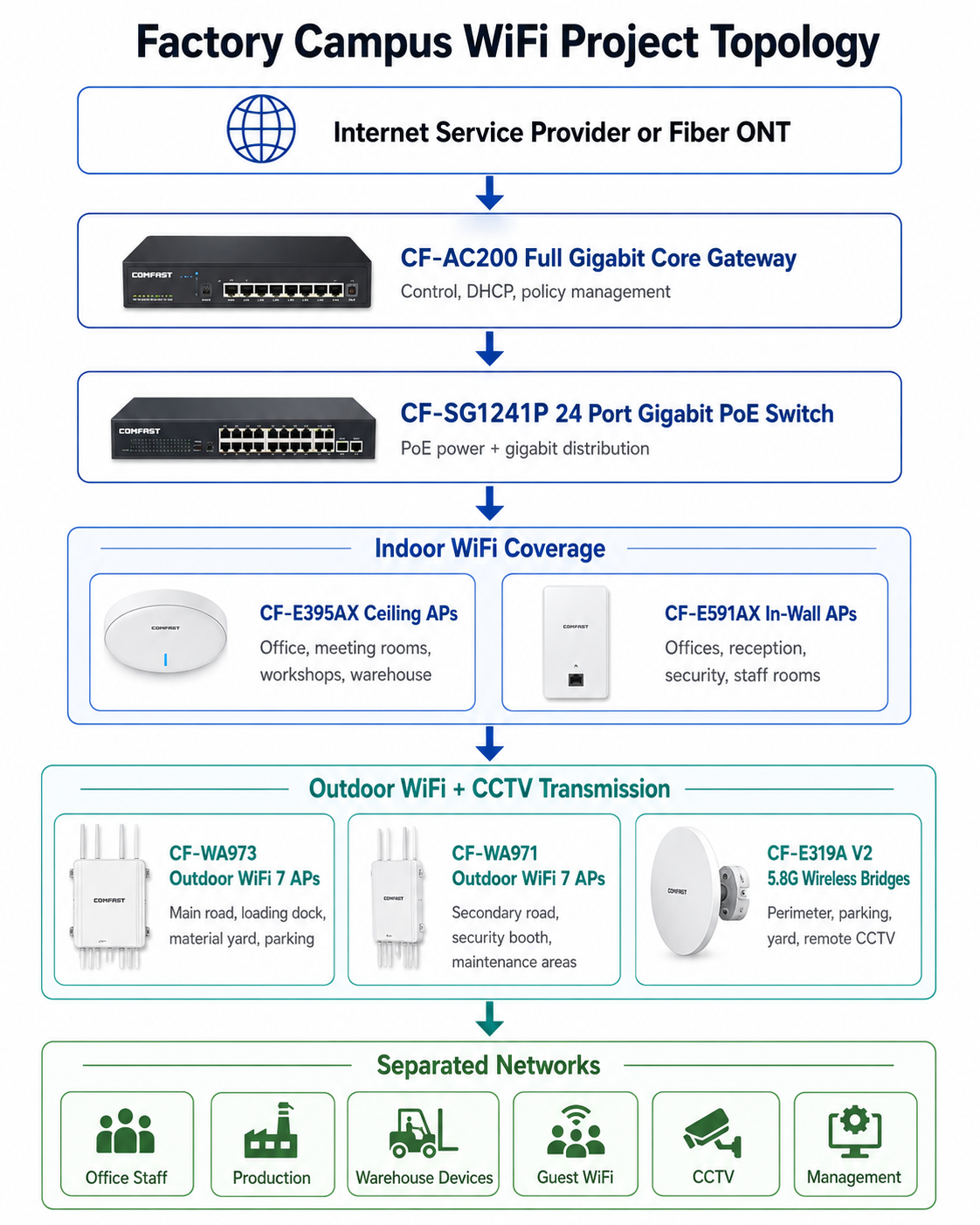
6. Site Survey and Troubleshooting Process
Factory Workflow Survey
We walked the full factory workflow with the operations manager, IT supervisor, production supervisor, warehouse manager, and security supervisor. We followed the path from office to production workshop, from SMT area to inspection area, from warehouse aisles to loading dock, from material yard to outdoor road, and from security booth to perimeter fence. This helped us design the WiFi system around real factory operations.
Indoor RF Testing
We tested signal in the office building, meeting rooms, production workshop, SMT workshop, warehouse aisles, inspection area, training room, staff rest area, and loading dock transition zone. We confirmed that the workshop and warehouse needed a different AP plan from the office because of metal machines, racks, and moving equipment.
Production Equipment and Metal Reflection Analysis
The production workshop contained SMT lines, metal worktables, test equipment, electrical cabinets, and machine enclosures. These caused reflections and blocked coverage in certain directions. We adjusted CF-E395AX ceiling AP positions based on real RF measurements, not only the workshop floor plan.
Warehouse Scanner and Forklift Route Testing
We tested handheld scanners and PDA terminals in warehouse aisles, staging areas, dock doors, and forklift routes. The most sensitive locations were rack intersections and loading transition areas. We tuned AP placement for real device behavior rather than phone signal bars only.
Outdoor Coverage Survey
We tested the main factory road, secondary road, material yard, loading dock exterior, parking lot, visitor entrance, canteen exterior, dormitory entrance, staff walkway, and back service route. This survey helped us decide where CF-WA973 and CF-WA971 outdoor APs should be installed.
Remote CCTV Bridge Path Survey
We inspected perimeter cameras, parking edge cameras, material yard cameras, and back service road cameras. For each CF-E319A V2 wireless bridge link, we checked line of sight, mounting height, vehicle obstruction risk, cable route, PoE access, weather exposure, and security requirements.
Network Room and PoE Readiness Check
The factory network room had fiber access and cabinet space, but the old labels were incomplete. We tested existing cable routes, planned the CF-AC200 gateway installation, installed the CF-SG1241P PoE switch, and built a clear port map for APs, bridges, and monitoring points.
7. Problems Found During Implementation
Office WiFi Could Not Be Used as Factory-Wide WiFi
The old design extended office WiFi toward the workshop and warehouse, but that approach could not support a real factory environment. We redesigned the network with dedicated APs for office, production, warehouse, and outdoor zones.
Metal Machines Created Coverage Shadows
Several workshop areas had signal shadows behind machines and electrical cabinets. We changed AP locations and adjusted transmit power to reduce blind spots without creating excessive interference.
Warehouse Aisles Needed Directional Planning
The warehouse racks blocked signal across aisles. We placed CF-E395AX ceiling APs based on aisle direction, rack height, forklift route, and scanning activity. This improved coverage consistency for handheld terminals.
Loading Dock Transition Was a Critical Weak Point
Workers moved between indoor warehouse coverage and outdoor loading lanes. The transition zone needed both indoor AP planning and outdoor AP support. We used CF-E395AX inside and CF-WA973 outside to keep warehouse scanning devices stable near dock doors.
Remote CCTV Cabling Was Not Practical
Some camera points were located across roads, around corners, or near the perimeter fence. Running new cable would have required civil work and risked disruption to factory traffic. CF-E319A V2 wireless bridges provided a cleaner and faster solution.
Network Isolation Was Necessary
A factory campus cannot place office laptops, production terminals, warehouse scanners, guests, cameras, and management devices into the same network. We implemented network separation to protect business operations and simplify troubleshooting.
Installation Had to Avoid Production Interruption
The production workshop could not stop for network installation. We coordinated with shift supervisors and completed work in sections during night shifts, lunch breaks, and approved maintenance periods.
8. Final Engineering Solution
Core Gateway and Policy Control
We installed the CF-AC200 full gigabit core gateway as the main network control point. It handled DHCP, office staff access, production operation traffic, warehouse device access, guest WiFi, CCTV traffic, and management access. This gave the factory a structured and maintainable network foundation.
Centralized PoE Distribution
The CF-SG1241P 24 port gigabit PoE switch powered indoor APs, outdoor APs, wireless bridges, and selected monitoring points. Centralized PoE reduced power adapter clutter and made maintenance easier for the IT team.
Indoor Workshop and Warehouse Coverage
CF-E395AX ceiling APs were installed in open office areas, meeting rooms, production workshops, warehouse aisles, inspection zones, training rooms, and loading transition areas. The AP layout was adjusted after field testing to reduce dead zones caused by machines and racks.
Room-Level Office and Staff Area Coverage
CF-E591AX in-wall APs were used in office rooms, supervisor rooms, reception rooms, security office, staff rest areas, and smaller training rooms. This gave focused coverage without overloading nearby ceiling APs.
Outdoor Main Area Coverage
CF-WA973 outdoor WiFi 7 APs were installed in high-traffic outdoor areas, including the main factory road, loading dock exterior, material yard, parking area, visitor entrance, canteen exterior, and main staff walkway.
Outdoor Secondary Area Coverage
CF-WA971 outdoor WiFi 7 APs were installed in the secondary factory road, security booth, back service route, dormitory entrance, outdoor corners, equipment maintenance area, and lower-density outdoor work zones.
CCTV Wireless Transmission
CF-E319A V2 5.8G wireless bridges were used for perimeter fence cameras, material yard cameras, parking cameras, back service road cameras, and remote monitoring points. This avoided unnecessary trenching and reduced construction impact.
9. Different Area Network Design
Administration Office Coverage
The administration office used CF-E395AX ceiling APs in open areas and CF-E591AX in-wall APs in office rooms and meeting rooms. This design supported office laptops, mobile phones, meeting devices, and guest reception needs.
R&D Office and Meeting Room Coverage
The R&D office required stable internal access and better security separation. We provided controlled office staff network access and avoided mixing guest devices with R&D user traffic.
Production Workshop Coverage
The production workshop was covered with CF-E395AX ceiling APs. AP locations were selected around machine rows, inspection positions, supervisor routes, and production reporting points. We avoided mounting APs directly above heat-heavy or high-vibration equipment.
SMT Workshop Coverage
The SMT workshop had dense equipment and strict operation rules. We planned installation during approved maintenance windows and adjusted AP positions to reduce signal blocking from production lines and electrical cabinets.
Warehouse Aisle Coverage
Warehouse aisles used CF-E395AX ceiling APs with careful placement around rack direction and forklift paths. We tested handheld scanners and PDA terminals instead of relying only on mobile phone speed tests.
Loading Dock Coverage
The loading dock required both indoor and outdoor coverage. CF-E395AX ceiling APs covered the warehouse side, while CF-WA973 outdoor APs covered the exterior dock and truck lane side. This improved scanner stability during inbound and outbound operations.
Main Factory Road Coverage
The main factory road used CF-WA973 APs to support supervisors, logistics staff, security patrols, and maintenance personnel. APs were installed with attention to vehicle height, truck movement, and cable protection.
Material Yard Coverage
The material yard required WiFi for inventory checks, logistics coordination, and security monitoring. CF-WA973 APs provided outdoor coverage, while CF-E319A V2 bridges supported remote camera backhaul.
Security Booth Coverage
The security booth used CF-WA971 outdoor AP coverage and a dedicated staff network policy. Security staff could access monitoring systems and visitor management tools without depending on guest WiFi.
Dormitory Entrance and Canteen Exterior Coverage
The dormitory entrance and canteen exterior were staff-heavy areas during shift changes and meal times. We planned AP capacity and placement to handle short bursts of user connections.
10. Indoor and Outdoor Installation Details
Indoor AP Mounting
Indoor APs were installed according to ceiling structure, machine layout, lighting position, cable routes, fire safety requirements, and maintenance access. We avoided installation directly above high-temperature equipment, moving machinery, or hard-to-service locations.
Outdoor AP Mounting
Outdoor APs were installed based on real user areas, road direction, logistics lanes, and security patrol routes. We selected mounting heights that improved coverage while keeping devices safe from vehicle impact and easy enough to maintain.
Cable Protection and PoE Power
PoE power from the CF-SG1241P reduced local power adapter use. Outdoor cable routes were protected with proper routing, drip loops, and secure fastening. Indoor cables were organized and labeled to simplify future maintenance.
Channel and Power Optimization
After installation, we tuned AP channels and transmit power. We did not set all APs to maximum power. In a factory environment, uncontrolled power can create interference and sticky client problems. Correct tuning improved roaming and connection stability.
Labeling and Documentation
Every AP, bridge device, and key cable port was labeled. The customer received AP location records, wireless bridge records, switch port maps, network policy notes, and topology documentation.
11. Wireless Bridge Transmission Design
Perimeter Fence Camera Bridge
Perimeter fence cameras were connected through CF-E319A V2 5.8G wireless bridges. We selected mounting points with clear line of sight and reduced obstruction from parked vehicles, trees, and building corners.
Material Yard Camera Backhaul
Material yard cameras were important for security and inventory monitoring. Wireless bridge transmission avoided long outdoor cable routes across logistics lanes and temporary storage areas.
Parking Area Camera Bridge
Parking area cameras were far from the main network cabinet. CF-E319A V2 bridges provided stable video backhaul without digging across the parking surface.
Back Service Road Camera Transmission
The back service road was used by maintenance and logistics vehicles. Bridge links were aligned and tested to avoid obstruction from trucks and temporary material stacks.
Bridge Stability Testing
Each CF-E319A V2 bridge link was tested for video continuity, delay, and stability. We verified camera feeds from the monitoring room during normal production hours and night security periods.
12. Network Segmentation and Security Design
Office Staff Network
The office staff network supported administration, HR, finance, R&D, managers, and office meeting devices. It was separated from guest WiFi, cameras, and production terminals.
Production Operation Network
The production operation network supported workshop supervisors, production reporting devices, inspection tablets, and approved operation terminals. This network received more controlled access policies than general office WiFi.
Warehouse Device Network
The warehouse device network supported handheld scanners, PDA terminals, forklift terminals, and loading dock devices. This network was treated as a business-critical wireless service.
Guest WiFi Network
The guest WiFi network served visitors, contractors, suppliers, and interview candidates. It provided internet access without exposing office, production, warehouse, CCTV, or management systems.
CCTV Network
The CCTV network carried video traffic from wired cameras and CF-E319A V2 wireless bridge links. Keeping camera traffic separate improved monitoring stability and troubleshooting clarity.
Management Network
The management network was reserved for gateway, PoE switch, AP, and wireless bridge maintenance. Access was limited to authorized IT and engineering users.
13. What We Did Differently from Other Engineering Teams
We Did Not Treat the Factory as One Big Office
A factory campus has office areas, production areas, warehouse areas, outdoor roads, and security zones. Each area has different users and different wireless behavior. We designed the network by function, not only by floor area.
We Tested Real Factory Devices
We tested handheld scanners, PDA terminals, inspection tablets, and staff devices in real working locations. A phone speed test alone cannot represent factory WiFi quality.
We Planned Around Machines, Racks, and Forklift Routes
We considered machine placement, metal reflection, rack direction, forklift movement, loading dock transitions, and outdoor logistics routes. This improved practical coverage where the factory actually needed it.
We Protected Business Networks from Guest Access
Guest WiFi was separated from office staff, production operation, warehouse devices, CCTV, and management access. This improved security and reduced operational risk.
We Used Wireless Bridges Instead of Disruptive Outdoor Cabling
For remote CCTV points, we used CF-E319A V2 wireless bridges instead of trenching across factory roads and logistics lanes. This reduced construction impact and shortened deployment time.
We Delivered a Maintainable System
The customer received AP location records, bridge alignment notes, switch port labels, topology documentation, and troubleshooting guidance. The system was built for long-term operation, not just installation day.
14. Project Acceptance Results
Final Acceptance Checklist
Administration office WiFi test passed.
R&D office and meeting room WiFi test passed.
Production workshop coverage test passed.
SMT workshop WiFi test passed.
Warehouse aisle scanner test passed.
Loading dock transition coverage test passed.
Main factory road outdoor WiFi test passed.
Material yard WiFi and CCTV test passed.
Parking area coverage test passed.
Security booth network test passed.
Dormitory entrance and canteen exterior coverage test passed.
Remote CCTV wireless bridge test passed.
Office staff, production operation, warehouse device, guest WiFi, CCTV, and management network isolation test passed.
Device labels, AP location map, bridge alignment records, port map, topology notes, and IT handover completed.
15. Customer and User Feedback
Factory Operations Manager Feedback
The factory operations manager said, “The workshop and warehouse coverage are much more stable now. Our supervisors and warehouse team can use mobile terminals without walking back toward the office area.”
IT Supervisor Feedback
The IT supervisor said, “The network segmentation and port labels are very helpful. We can clearly manage office staff, production devices, warehouse scanners, guest WiFi, CCTV, and management access.”
Warehouse Manager Feedback
The warehouse manager said, “The scanning devices are more stable in the aisles and near the loading dock. The team no longer needs to repeat uploads as often.”
Security Supervisor Feedback
The security supervisor confirmed that remote perimeter and material yard cameras became more stable after the CF-E319A V2 wireless bridge deployment. Night monitoring also became easier.
Production Supervisor Feedback
A production supervisor reported that inspection tablets and production reporting devices were more reliable around the workshop and SMT areas after the upgrade.
Office Staff Feedback
Office staff reported better meeting room connectivity and fewer WiFi drops during video meetings and file access.
16. Project Summary
Final Result
Project BayTech Manufacturing Campus was a successful indoor and outdoor integrated WiFi coverage project for a factory park in Shenzhen. The project solved uneven workshop coverage, warehouse scanner dropouts, loading dock transition problems, outdoor road blind spots, remote CCTV backhaul issues, guest network risks, and poor documentation from the previous system.
The final COMFAST solution used the CF-AC200 full gigabit core gateway, CF-SG1241P 24 port gigabit PoE switch, CF-E395AX WiFi 6 ceiling APs, CF-E591AX WiFi 6 in-wall APs, CF-WA973 outdoor WiFi 7 APs, CF-WA971 outdoor WiFi 7 APs, and CF-E319A V2 5.8G wireless bridges. This combination supported office access, production operations, warehouse devices, outdoor coverage, CCTV wireless transmission, guest WiFi, and centralized maintenance.
The key value of the project was not simply adding more APs. The real value was building a factory campus network around office workflow, production movement, warehouse scanning, outdoor logistics, security monitoring, and long-term IT maintenance.
17. Lessons Learned and Advice to Other Contractors
Lessons Learned
Factory campus WiFi must be designed by business zone, not only by building area.
Production workshops and warehouses need real RF testing because machines, racks, and metal surfaces change wireless behavior.
Warehouse scanners and PDA terminals should be tested in real working locations, especially near loading docks and rack intersections.
Outdoor factory roads, loading areas, and material yards require dedicated outdoor AP planning.
Wireless bridges are useful for remote CCTV points where trenching would interrupt factory logistics.
Office staff, production devices, warehouse devices, guest WiFi, CCTV, and management access should be separated by policy.
AP power and channel tuning are essential in metal-heavy factory environments.
A professional handover should include AP maps, bridge records, port labels, topology notes, and maintenance guidance.
Advice to Other WiFi Engineering Contractors
For factory campus WiFi projects, do not design only from CAD drawings. Walk the workshop, warehouse, loading dock, outdoor road, material yard, office area, and security points. Test where people and devices actually work.
Do not treat warehouse and production WiFi like office WiFi. Factory environments include metal machines, racks, forklifts, electrical cabinets, and moving goods. The correct design must protect operational devices first.
Do not mix office laptops, production terminals, warehouse scanners, guest devices, cameras, and management equipment in one flat network. A professional factory network must be segmented from the beginning.
An Indoor and Outdoor Factory Campus WiFi Coverage Solution is complete only when office users work smoothly, production terminals stay online, warehouse scanners remain stable, outdoor patrols are connected, CCTV cameras transmit reliably, and the IT team can maintain the system confidently. That was the standard we delivered for Project BayTech Manufacturing Campus.