Project SkyCrane Security Link: Tower Crane Wireless Monitoring Solution for a High-Rise Construction Site in Dubai
Contractor Team Introduction
We are a local WiFi and wireless CCTV transmission engineering contractor with long-term experience in construction site monitoring, tower crane camera backhaul, hook camera wireless transmission, crane cabin monitoring, site perimeter CCTV, construction elevator monitoring, gatehouse security networks, real-name access channel monitoring, material yard surveillance, temporary office networks, PoE-powered deployment, wireless bridge alignment, and NVR monitoring room integration.
A Tower Crane Wireless Monitoring project is very different from a normal construction site camera installation. The crane is high, the jib rotates, the hook moves continuously, steel structures create reflection, concrete cores and scaffolding create obstruction, and ordinary cabling is not suitable for the cabin, jib, or hook camera positions. The system must return stable video to the NVR while keeping delay low enough for the safety team to review lifting operations in real time.
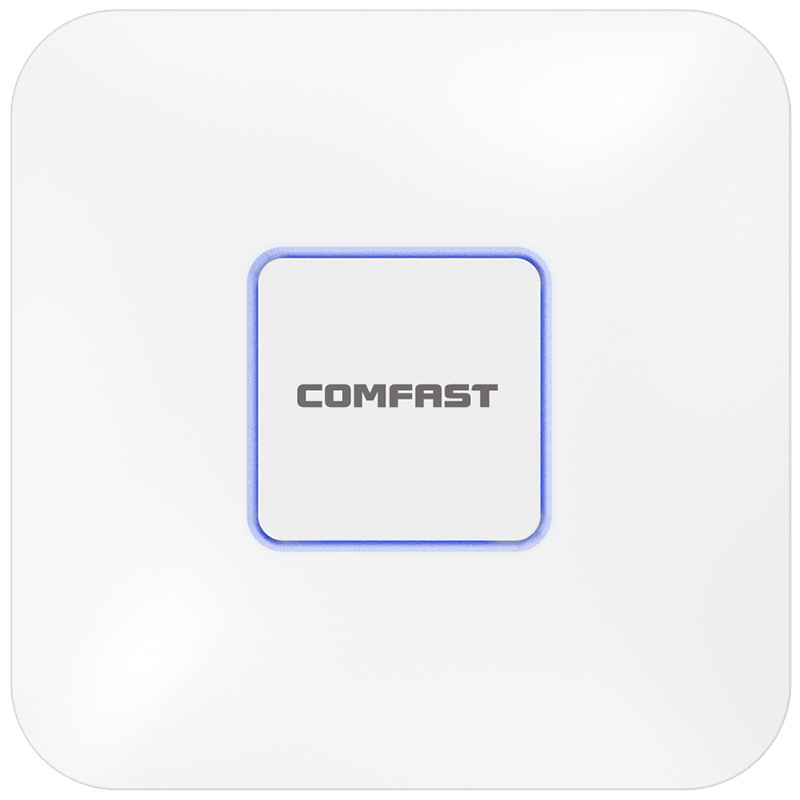
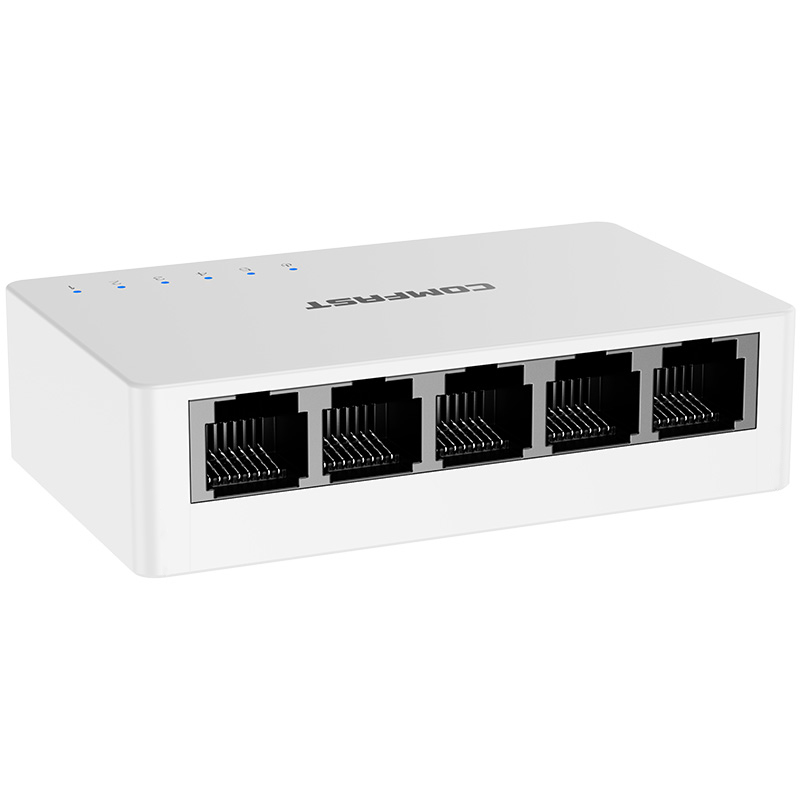
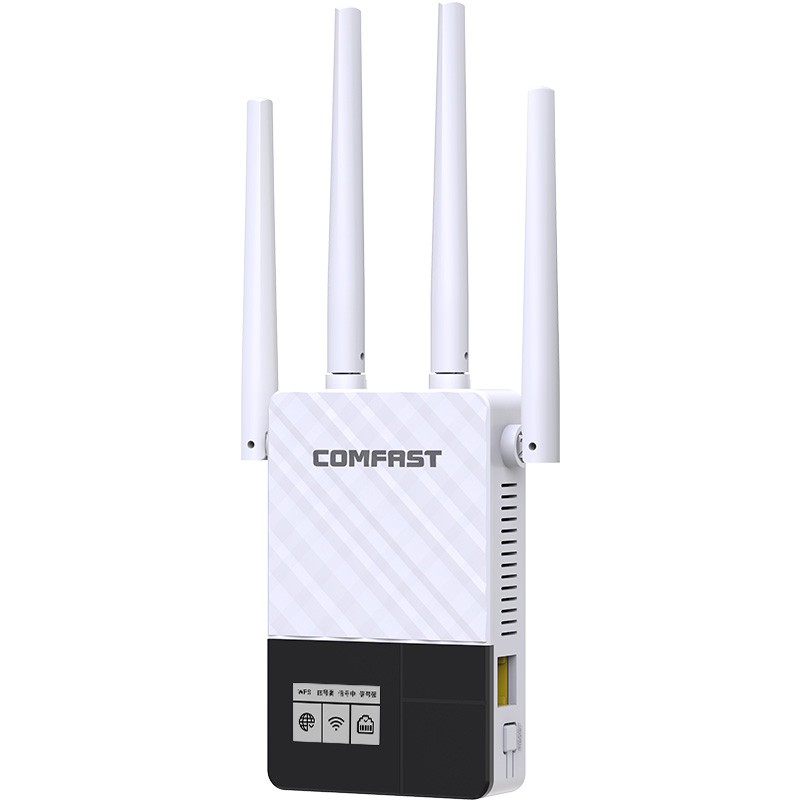
Our team has used COMFAST equipment in many construction sites, warehouse yards, factory perimeter projects, tower crane monitoring upgrades, gatehouse CCTV projects, outdoor wireless backhaul systems, and temporary project office networks. From our field experience, COMFAST gateways, PoE switches, WiFi 6 routers, outdoor APs, and wireless bridges are practical for construction environments because they support flexible CCTV backhaul, centralized PoE power, stable outdoor transmission, fast temporary deployment, and clear long-term maintenance. For this project, we selected COMFAST CF-AC300 full gigabit core gateway, CF-SG1241P 24-port gigabit PoE switch, CF-WR630AX WiFi 6 router, CF-WA937 outdoor WiFi 6 APs, CF-E113A V2 5.8G wireless bridges, CF-E312A V2 5.8G wireless bridges, and CF-E319A V3 long-distance wireless bridges.
1. Project Overview
Project Name: Project SkyCrane Security Link
Project Location: Business Bay District, Dubai, United Arab Emirates
Site Type: High-rise commercial tower construction site with multiple tower cranes, material yards, temporary offices, gatehouse access, construction elevators, perimeter fencing, vehicle routes, and night construction zones
Building Scale: 2 basement levels, 6 podium levels, and 48 tower floors under construction
Tower Cranes Included: 3 tower cranes
Crane Height During Deployment: 72 meters to 126 meters
Working Radius: 55 meters to 70 meters, depending on the crane position
CCTV Cameras Included in Upgrade: 58 cameras
Remote Cameras Requiring Wireless Backhaul: 22 cameras
NVR Location: Site monitoring room inside the project management office
Main Monitoring Areas: Tower crane cabins, jib camera points, hook operation views, crane bases, main construction road, material yard, rebar processing area, formwork processing area, concrete pump area, construction elevators, worker passages, gatehouse, real-name access channel, vehicle entrance, temporary office area, site perimeter, temporary material stacking area, and night construction zone
Project Goal: Build a stable tower crane wireless monitoring system with low-delay hook camera video, reliable jib and cabin camera backhaul, continuous NVR recording, controlled maintenance WiFi, outdoor CCTV wireless transmission, and separated CCTV and management networks.
2. Customer Pain Points Before the Project
The tower crane cabin camera feeds were unstable. The previous system used temporary wireless devices without proper bridge alignment, and the video occasionally froze when the crane rotated or when steel structures blocked the signal path.
The hook camera video had noticeable delay during lifting operations. The safety team could see the hook view, but the delay made it difficult to use the image confidently during active hoisting review and incident verification.
Jib camera backhaul was not continuous. When the crane boom rotated toward the concrete core or temporary scaffolding, the image became unstable or dropped out for short periods.
Crane base cameras and material yard cameras often went offline during busy periods. The real issue was not only the cameras; unstable PoE power, poor field box protection, weak bridge positioning, and mixed network traffic all contributed to the problem.
NVR recording had occasional frame loss, especially during night work and heavy lifting periods. Several cameras increased bitrate at night, but the old links had no reserved bandwidth margin.
Re-cabling tower crane cabin, jib, and hook camera points was not practical. Ordinary network cables are not suitable for long-term moving and rotating crane structures, and temporary cable routes create safety risks.
The construction road and temporary material stacking areas changed frequently. Camera locations had to be flexible because vehicle routes, material storage, scaffolding, and concrete pump positions changed during different construction phases.
Several wireless bridge links used the same channel. When tower crane cameras, ground cameras, and perimeter cameras transmitted at the same time, interference caused video freezing and packet loss.
The CCTV network and project office network were mixed in some field boxes. Office browsing, temporary management WiFi, camera video, and NVR traffic were not separated clearly, which made troubleshooting difficult and reduced video stability.
Device labels were incomplete. Some cameras, wireless bridges, PoE ports, and uplinks had no clear records, so the equipment maintenance team spent too much time locating the correct link when a camera went offline.
3. Customer Requirements
Provide stable video backhaul for tower crane cabin cameras, jib cameras, hook cameras, crane base cameras, construction road cameras, material yard cameras, rebar processing area cameras, construction elevator cameras, gatehouse cameras, real-name access channel cameras, vehicle entrance cameras, temporary office cameras, site perimeter cameras, and night construction cameras.
Keep tower crane hook camera video as low-delay and stable as possible for safety review and lifting visibility.
Support continuous NVR recording, live preview, remote review, playback, and night video recording.
Use wireless bridge transmission for crane cabin, jib, hook, remote perimeter, and hard-to-cable construction points.
Keep CCTV network separated from project office network, temporary management WiFi, and device management access.
Provide controlled outdoor maintenance WiFi for the safety team, tower crane safety officer, site supervisor, equipment maintenance engineer, and commissioning engineers.
Use centralized PoE power where practical for cameras, wireless bridges, outdoor APs, and monitoring devices.
Install all outdoor and high-elevation equipment with waterproofing, dust protection, secure brackets, grounding review, lightning protection review, and maintenance access.
Complete construction without affecting crane lifting schedules, concrete pouring, vehicle transport, worker passage, safety inspections, night construction, or project progress.
Project handover must include topology diagram, device labels, camera point list, AP location list, wireless bridge direction records, switch port map, and acceptance test results.
4. COMFAST Equipment Used in This Project
The following are the main COMFAST equipment models used in this project and their usage descriptions.
| Equipment Model |
Type | Project Use | Reason for Use |
|---|---|---|---|
| CF-AC300 | Full gigabit core gateway | CCTV network access, DHCP, NVR integration, tower crane monitoring traffic, management policy, and maintenance access control | Suitable as the site monitoring network core gateway, separating CCTV video, tower crane monitoring, office network, and management access |
| CF-SG1241P | 24-port gigabit PoE switch | Centralized PoE power and gigabit aggregation for cameras, wireless bridges, outdoor APs, and monitoring devices | Provides stable PoE power, cleaner field box deployment, easier labeling, and simpler maintenance for construction site CCTV systems |
| CF-WR630AX | WiFi 6 router | Project management office, monitoring room, equipment room, temporary commissioning, emergency support, and authorized management wireless access | Provides controlled management WiFi for engineers and site supervisors without mixing with CCTV video traffic |
| CF-WA937 | Outdoor WiFi 6 AP | Crane bases, main construction roads, material yards, construction elevators, gatehouse areas, vehicle entrances, temporary office exterior, and outdoor maintenance WiFi zones | Supports controlled outdoor maintenance access and helps engineers check camera return, bridge status, and NVR connectivity on site |
| CF-E113A V2 | 5.8G wireless bridge | High-priority tower crane wireless backhaul for crane cabin cameras, jib cameras, hook cameras, cross-building links, and tower crane monitoring transmission | Used for critical crane video links requiring stable transmission, low delay, stronger alignment, and reliable NVR recording continuity |
| CF-E312A V2 | 5.8G wireless bridge | Mid-distance CCTV backhaul for crane base cameras, construction road cameras, gatehouse cameras, material yard cameras, construction elevator cameras, and remote site points | Avoids unsafe temporary cabling across active construction roads, lifting areas, material routes, and changing site layouts |
| CF-E319A V3 | Long-distance wireless bridge | Long-distance CCTV backhaul across large construction zones, remote perimeter cameras, cross-road monitoring points, and far-side project area cameras | Suitable for remote monitoring points where new Ethernet cabling would be unsafe, disruptive, or difficult to maintain |
5. Project Equipment Configuration Quantity
Based on the high-rise construction site with 3 tower cranes, crane height from 72 meters to 126 meters, 58 CCTV cameras, 22 remote cameras requiring wireless backhaul, crane cabin cameras, jib cameras, hook camera systems, crane bases, construction roads, material yards, construction elevators, gatehouse, vehicle entrance, temporary office area, site perimeter, and night construction zones, the recommended equipment configuration for this project was as follows:
| Equipment Model | Quantity | Deployment Location |
|---|---|---|
| CF-AC300 | 1 unit | Site monitoring room inside the project management office, used as the core gateway for CCTV access, NVR integration, tower crane monitoring traffic, management policy, and maintenance access control |
| CF-SG1241P | 4 units | Core equipment room, tower crane base distribution boxes, gatehouse / vehicle entrance distribution point, and material yard / construction elevator distribution point for PoE power, camera aggregation, bridge connection, uplink ports, and maintenance reserve |
| CF-WR630AX | 2 units | Project management office, monitoring room, and equipment room for temporary commissioning, emergency network support, authorized management wireless access, and maintenance tool connectivity |
| CF-WA937 | 6 units | Crane base areas, main construction roads, material yards, construction elevators, gatehouse area, vehicle entrance, temporary office exterior, and outdoor maintenance WiFi zones |
| CF-E113A V2 | 8 pairs | Three tower crane cabin camera links, jib camera links, hook camera video links, cross-building camera links, and high-priority tower crane monitoring transmission points |
| CF-E312A V2 | 8 pairs | Crane base cameras, construction road cameras, gatehouse cameras, material yard cameras, construction elevator cameras, real-name access channel cameras, and medium-distance remote CCTV backhaul points |
| CF-E319A V3 | 6 pairs | Remote perimeter cameras, cross-road monitoring points, far-side project area CCTV backhaul, temporary material stacking area cameras, and night construction monitoring points |
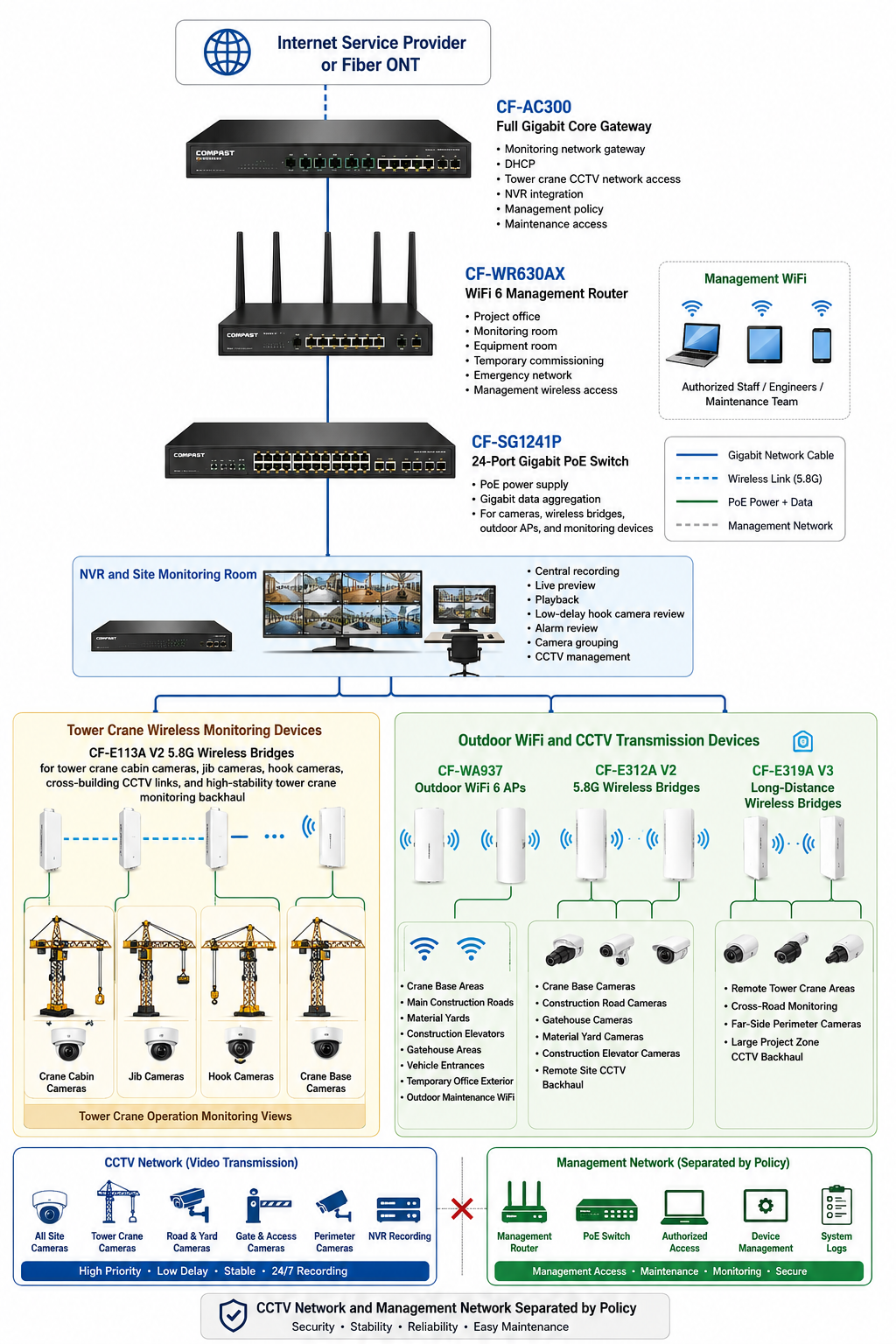
6. Project Topology Diagram
7. Site Survey and Troubleshooting Process
We began the project with a full survey together with the project manager, safety director, tower crane supervisor, site supervisor, IT supervisor, security supervisor, equipment maintenance engineer, night shift safety officer, gatehouse guard, and electrical safety officer. We checked the site from the monitoring room to the crane bases, from the crane cabin to the jib camera positions, and from the hook camera view to the material yard and construction roads.
At the tower crane cabin points, we checked power availability, camera mounting positions, bridge installation options, crane rotation behavior, cabin vibration, heat exposure, and maintenance access. The cabin link had to remain stable while the crane was actively working.
At the jib camera positions, we checked structural mounting points, cable protection, wireless line of sight, crane rotation angle, boom movement, and possible obstruction from the concrete core and temporary scaffolding. We confirmed that ordinary long network cables were not suitable for this moving environment.
At hook camera points, we analyzed expected viewing direction, lifting height, signal path, movement range, video delay requirement, and safety review use case. Hook camera video had to be as stable and low-delay as possible because it was used for operation review and safety observation.
At crane bases, we inspected field boxes, PoE power conditions, bridge receiving positions, grounding condition, weather exposure, dust protection, and cable routing. Crane base areas also needed controlled outdoor maintenance WiFi for engineers and safety officers.
On the main construction roads, we tested camera angles, vehicle movement, concrete mixer truck routes, crane lifting zones, and temporary obstruction from parked machinery. Several camera points required wireless backhaul because road routes changed during construction phases.
At the material yard, rebar processing area, formwork processing area, and concrete pump area, we checked camera coverage, bridge visibility, dust exposure, equipment collision risk, and night work requirements. These zones changed frequently as the structure went higher.
At construction elevators, worker passages, gatehouse, real-name access channel, and vehicle entrance, we checked camera view, access control devices, worker flow, visitor registration, and traffic control needs. These points required stable monitoring for daily site management.
Along the site perimeter and temporary material stacking areas, we confirmed line of sight, bridge mounting height, power source, dust exposure, wind exposure, and future relocation needs. Some far-side perimeter cameras required CF-E319A V3 long-distance wireless bridge links.
We scanned wireless interference around the site and planned channels by link group. Tower crane camera links, ground camera links, and perimeter links were separated to reduce interference and protect hook camera delay performance.
8. Problems Found During Implementation
Tower crane camera instability was not caused by the cameras alone. The real causes included high-elevation power conditions, bridge alignment, crane rotation, steel structure reflection, concrete core obstruction, and channel interference.
Hook camera video needed a stronger and cleaner wireless backhaul path. The previous link could connect, but it did not provide enough stability and delay control during lifting movement.
The crane cabin and jib positions were not suitable for ordinary long network cable routes. Moving crane structures, rotation, vibration, weather exposure, and maintenance safety made wireless bridge backhaul the correct design direction.
Bridge devices could not be mounted at low convenient points. The building core, scaffolding, crane jib, lifting materials, vehicles, and temporary facilities could all block links. We adjusted bridge height and direction based on real crane movement and site structures.
Multiple wireless bridge links could not share the same channel. We separated tower crane links, ground camera links, and perimeter camera links into different groups to reduce interference.
Night infrared video required bandwidth margin. Crane base, perimeter, material yard, and gatehouse cameras were tested at night to confirm NVR recording stability under low-light conditions.
Site management WiFi could not be mixed with CCTV video traffic. We separated CCTV traffic and management access through gateway policy to protect NVR recording and crane camera video return.
High-elevation and outdoor equipment required waterproofing, dust protection, stable brackets, grounding review, lightning protection review, and safe maintenance access. Construction-site dust and heat made field-box protection especially important.
Installation work had to avoid lifting peaks, concrete pours, material delivery hours, vehicle traffic peaks, night work, and safety inspection periods. All high-elevation work was scheduled with safety permits and tool tethering requirements.
9. Final Engineering Solution
The CF-AC300 was deployed as the full gigabit core gateway for the tower crane monitoring network. It provided DHCP, CCTV access, NVR integration, management policy, and separation between CCTV traffic and management access.
The CF-SG1241P 24-port gigabit PoE switch was installed in the project office equipment room for centralized PoE power and gigabit data aggregation. It powered cameras, bridge devices, outdoor APs, and selected monitoring devices.
The CF-WR630AX WiFi 6 router provided controlled management wireless access in the project office, monitoring room, and equipment room. It also supported temporary commissioning and emergency network access during maintenance work.
CF-E113A V2 5.8G wireless bridges were assigned to high-priority tower crane camera links, including cabin cameras, jib cameras, and hook cameras. These links were aligned and tested for low delay, stable preview, recording, and crane movement conditions.
CF-E312A V2 5.8G wireless bridges were used for mid-distance CCTV backhaul from crane bases, construction roads, gatehouse cameras, material yards, construction elevators, and remote ground monitoring points.
CF-E319A V3 long-distance wireless bridges were deployed for far-side perimeter cameras, cross-road monitoring points, and remote site zones where stable long-distance transmission was required.
CF-WA937 outdoor WiFi 6 APs were installed around crane bases, construction roads, material yards, construction elevator areas, vehicle entrances, and temporary office exterior zones for controlled maintenance WiFi and field inspection access.
10. Different Area Monitoring and Backhaul Design
NVR Site Monitoring Room Network: The monitoring room became the central point for live preview, continuous recording, playback, low-delay hook camera review, alarm review, and camera group management. All crane and ground cameras were grouped by site area.
Core Equipment Room Network: The core equipment room was reorganized with the CF-AC300, CF-WR630AX, and CF-SG1241P. Switch ports, bridge uplinks, APs, cameras, and NVR links were labeled and documented.
Tower Crane Cabin Camera Backhaul: Tower crane cabin cameras used CF-E113A V2 links. The links were tested during crane movement and rotation to confirm stable operator-view monitoring.
Jib Camera Wireless Backhaul: Jib cameras used dedicated bridge alignment because the jib rotated and passed near structural obstructions. We selected link angles that maintained stronger signal paths through the main working zones.
Hook Camera Wireless Backhaul: Hook camera links received priority tuning. We tested video delay, packet loss, live preview, hook movement, and night lifting visibility. The goal was stable low-delay video for safety review.
Crane Base Monitoring Network: Crane base cameras and CF-WA937 APs supported field maintenance, safety inspection, and equipment access. Crane base field boxes were protected from dust, rain, and construction impact.
Main Construction Road Camera Backhaul: Main road cameras monitored concrete trucks, material vehicles, mobile cranes, and worker crossings. CF-E312A V2 links were used where road changes made cabling unreliable.
Material Yard Monitoring: Material yard cameras covered steel bundles, formwork, prefabricated materials, and temporary stacking. Wireless backhaul allowed camera positions to adjust as the yard layout changed.
Rebar Processing Area Monitoring: Rebar processing cameras recorded cutting, bending, storage, and loading operations. Camera mounting positions avoided equipment collision and sparks from processing work.
Formwork Processing Area Monitoring: Formwork processing cameras covered material preparation and transfer. The system supported safety review and process traceability.
Concrete Pump Area Monitoring: Concrete pump area cameras monitored pump truck position, hose movement, worker safety, and concrete pouring coordination. Construction schedules were considered during installation.
Construction Elevator Monitoring: Construction elevator cameras monitored worker entry, cargo transfer, equipment condition, and queue areas. CF-E312A V2 links returned video where cable paths changed during building progress.
Worker Passage Camera Backhaul: Worker passage cameras covered pedestrian flow, safety route access, and emergency path visibility. Camera traffic remained inside the CCTV network.
Gatehouse Monitoring Network: Gatehouse cameras covered guard activity, visitor registration, vehicle entry, and access control. The gatehouse network was integrated into the CCTV network and separated from office traffic.
Real-Name Access Channel Monitoring: Real-name access channel cameras monitored worker entry, verification devices, queue flow, and access compliance. These cameras were tested during morning worker entry peak.
Vehicle Entrance and Exit Camera Backhaul: Vehicle entrance cameras monitored trucks, concrete mixers, delivery vehicles, and site traffic control. Bridge positions avoided obstruction from large vehicles and temporary gates.
Temporary Office Area Network: The temporary office area used the CF-WR630AX for management WiFi and network commissioning. Office access remained separated from tower crane CCTV traffic.
Site Perimeter Camera Backhaul: Site perimeter cameras used CF-E312A V2 and CF-E319A V3 wireless bridges depending on distance. The system improved after-hours and night-shift perimeter monitoring.
Temporary Material Stacking Area Monitoring: Temporary stacking area cameras used flexible wireless backhaul because material yard positions changed during construction phases.
Night Construction Area Monitoring: Night construction cameras were tested after dark for infrared video, lighting changes, and NVR recording continuity.
Remote CCTV Wireless Bridge Backhaul: Remote CCTV points were grouped by distance, line of sight, camera bitrate, and construction phase. Each link was tested for signal, bandwidth, latency, packet loss, live preview, recording, and playback.
Outdoor Maintenance WiFi Access: CF-WA937 APs provided controlled field access for safety officers, equipment maintenance engineers, and commissioning staff. This helped field teams check camera views and bridge status from crane bases and ground work zones.
11. Tower Crane Wireless Bridge, Outdoor AP, and Camera Installation Details
Tower crane bridge installation was planned around crane height, jib rotation, concrete core location, scaffolding position, steel structure reflection, and safe maintenance access. We avoided low and convenient installation points because they would be blocked as the building rose.
For cabin camera links, CF-E113A V2 bridges were installed with clear alignment toward the receiving point. Each link was tested while the crane was idle and while it rotated through the main working directions.
For jib and hook camera links, bridge direction and mounting stability were checked repeatedly. We tested hook movement, lifting height changes, video delay, and packet loss because the hook camera was a critical safety-view camera.
Ground camera bridge links used CF-E312A V2 for mid-distance points and CF-E319A V3 for long-distance perimeter and cross-road links. The links were grouped by direction to reduce interference.
CF-WA937 APs were mounted in protected outdoor positions around crane bases, construction roads, material yards, gatehouse areas, and temporary offices. These APs provided controlled maintenance WiFi rather than public access.
All high-elevation work followed site safety permit requirements. Tools were tethered, workers used approved fall-protection equipment, and installation windows were coordinated with the crane supervisor and safety director.
Outdoor cable routing used waterproof entry points, dust-protected field boxes, drip loops, secure brackets, and labeled paths. Grounding and lightning protection were reviewed at exposed outdoor and high-elevation points.
12. NVR and Site Monitoring Room Integration
The site monitoring room was reorganized as the central point for tower crane and site CCTV video. Camera groups were renamed according to actual zones, including tower crane cabin, jib, hook, crane base, construction road, material yard, processing areas, construction elevator, gatehouse, real-name access channel, vehicle entrance, temporary office, site perimeter, and night construction area.
We tested live preview, continuous recording, playback, alarm review, remote review, and low-delay hook camera viewing after each camera group was connected. This ensured the cameras were not only online but also recording and playing back reliably.
The monitoring team received a bridge-to-camera map showing which tower crane and ground camera groups returned through each wireless bridge link. This makes future troubleshooting faster because staff can identify whether a problem is camera-side, bridge-side, switch-side, power-side, or NVR-side.
The CF-WR630AX provided controlled management WiFi inside the project office and monitoring room. This access was separated from CCTV video traffic and project office user traffic.
13. Network Segmentation and Maintenance Design
CCTV Network: The CCTV network carried video from tower crane cameras, ground cameras, wireless bridge-connected cameras, and perimeter cameras to the NVR. It was separated from project office browsing and general management WiFi.
Management Network: The management network was reserved for the CF-AC300 gateway, CF-SG1241P PoE switch, CF-WR630AX router, CF-WA937 APs, wireless bridges, NVR access, and authorized maintenance devices.
Outdoor Maintenance WiFi: CF-WA937 APs provided controlled field access for safety officers, tower crane maintenance engineers, commissioning engineers, and site supervisors. This helped teams check camera views and wireless bridge status from field positions.
PoE Power Design: The CF-SG1241P centralized PoE power for cameras, APs, and wireless bridge devices where practical. For tower crane field boxes, power paths were documented and protected according to site safety requirements.
Documentation and Labeling: Every camera group, bridge link, AP, switch port, and field box was labeled. The handover package included topology, camera point list, AP location list, bridge direction records, port map, signal test results, and maintenance notes.
14. What We Did Differently from Other Engineering Teams
We did not simply connect tower crane cameras to wireless bridges and leave. We tested crane rotation, hook movement, day video, night video, steel structure obstruction, video bitrate, NVR recording, playback, delay, and packet loss.
We did not use the same channel for every link. Tower crane links, ground camera links, and perimeter links were grouped separately to reduce interference and protect hook camera performance.
We did not install bridges at low convenient points. Mounting height and direction were selected according to building height, scaffolding, crane rotation, jib position, vehicle height, and future site changes.
We did not mix CCTV video, site management WiFi, project office network, and management devices in one flat network. CCTV traffic and management access were separated by policy.
We did not pull unsafe temporary cables through crane structures, lifting zones, or active construction roads. Wireless bridge backhaul was used where it reduced risk and improved flexibility.
We did not interrupt lifting operation, concrete pouring, vehicle transport, worker access, or safety inspections. Construction was completed by zone during approved windows with safety permits and supervisor coordination.
We did not leave messy field boxes or unclear records. The customer received device labels, camera point tables, AP location lists, wireless bridge direction records, switch port maps, signal results, and maintenance guidance.
15. Project Acceptance Results
NVR continuous recording test passed.
Daytime live video preview test passed.
Night infrared video test passed.
Video playback and search test passed.
Tower crane cabin camera test passed.
Jib camera wireless backhaul test passed.
Hook camera low-delay video test passed.
Tower crane rotation video stability test passed.
Crane base camera test passed.
Main construction road camera test passed.
Material yard camera test passed.
Rebar processing area camera test passed.
Construction elevator camera test passed.
Gatehouse camera test passed.
Real-name access channel camera test passed.
Vehicle entrance camera test passed.
Site perimeter camera test passed.
Night construction area camera test passed.
Wireless bridge signal strength test passed.
Wireless bridge alignment angle inspection passed.
Bridge bandwidth test passed.
Bridge latency test passed.
Packet loss test passed.
Power-off recovery test passed.
PoE power supply test passed.
Waterproof field box inspection passed.
Grounding and lightning protection review passed.
Device label inspection passed.
Topology diagram, camera point list, AP location list, wireless bridge direction records, switch port map, signal test results, and acceptance report were delivered to the project team.
16. Customer and User Feedback
Project Manager Feedback: “The tower crane monitoring system is much more stable now. We can review crane operation, material yard activity, and site traffic from the monitoring room more confidently.”
Safety Director Feedback: “The hook camera video is smoother and the delay is lower. This helps our safety team review lifting operations and respond faster when there is a risk.”
Tower Crane Operator Feedback: “The cabin and hook camera views are more consistent now. The video no longer freezes the way it did before during normal rotation.”
Site Supervisor Feedback: “The construction road, material yard, and concrete pump area cameras are clearer and easier to review during coordination meetings.”
IT Supervisor Feedback: “The device labels, bridge direction records, and switch port map make maintenance much faster. We can identify each crane camera path clearly.”
Security Supervisor Feedback: “Gatehouse, vehicle entrance, and perimeter cameras are more stable, especially during night shifts.”
Equipment Maintenance Engineer Feedback: “The bridge installation and field boxes are cleaner. Maintenance WiFi near the crane bases helps us check device status on site.”
Night Shift Safety Officer Feedback: “Night infrared video is more stable for the crane base, material yard, and perimeter cameras. Playback review is much easier now.”
17. Project Summary
Project SkyCrane Security Link was a successful Tower Crane Wireless Monitoring project for a high-rise construction site in Dubai. The project solved unstable crane cabin video, hook camera delay, jib camera dropouts, crane base camera instability, material yard camera disconnections, NVR frame loss, night video instability, bridge channel interference, mixed network traffic, and unclear device maintenance records.
The final COMFAST solution used the CF-AC300 full gigabit core gateway, CF-SG1241P 24-port gigabit PoE switch, CF-WR630AX WiFi 6 router, CF-WA937 outdoor WiFi 6 APs, CF-E113A V2 5.8G wireless bridges, CF-E312A V2 5.8G wireless bridges, and CF-E319A V3 long-distance wireless bridges. This combination supported tower crane camera backhaul, low-delay hook camera monitoring, ground CCTV return, remote perimeter transmission, outdoor maintenance WiFi, PoE aggregation, NVR recording, and separated management.
The key value of this project was not simply installing wireless bridges on a construction site. The real value was designing the system around crane rotation, hook movement, high-elevation safety, steel structure reflection, construction phase changes, video delay, channel planning, PoE stability, outdoor protection, NVR recording, network separation, and safe maintenance.
18. Lessons Learned and Advice to Other Contractors
Tower crane wireless monitoring must start with crane movement analysis, not only camera quantity.
Hook camera video requires low-delay testing, packet loss testing, and real lifting movement testing.
Bridge line of sight must be checked under real site conditions, including crane rotation, concrete core obstruction, scaffolding, steel reflection, vehicle movement, and temporary facilities.
Wireless bridge mounting height should be selected according to building height, crane height, jib direction, scaffolding position, vehicle height, and maintenance safety.
Tower crane links, ground camera links, and perimeter links should be grouped by channel to reduce interference.
Night infrared video must be tested because camera bitrate increases after dark and can expose weak link margins.
CCTV traffic, site management WiFi, project office access, and device management should be separated by policy.
High-elevation installation must follow safety permits, fall-protection rules, tool tethering, power isolation, and supervisor coordination.
Construction must avoid lifting peaks, concrete pouring, material delivery peaks, worker access peaks, night work, and safety inspection windows.
Professional handover must include topology diagrams, camera point lists, AP location records, bridge direction records, signal test results, switch port labels, field box records, and maintenance guidance.
For tower crane projects, engineers must understand the crane’s working radius, rotation path, hook movement, building structure, lifting schedule, temporary facility layout, and future construction phases. A design that works on the first day must continue working as the tower rises and the site changes.
A Tower Crane Wireless Monitoring system is complete only when crane cameras stay online, hook video remains low-delay and stable, NVR recording is continuous, night video is reliable, remote site cameras return video clearly, management WiFi is controlled, bridge links are documented, and the project team can maintain the system safely. That was the standard we delivered for Project SkyCrane Security Link.