What exactly is “router port speed”?

In plain English, port speed is how much data a single Ethernet jack on your router can move every second. It is printed right next to the port in tiny letters:
– 10/100 M → 100 Mbps (Fast Ethernet)
– 10/100/1000 M → 1 000 Mbps, i.e. 1 Gbps (Gigabit Ethernet)
– 2.5 G → 2 500 Mbps (Multi-Gig)
To understand why it matters you have to look at two kinds of ports:
- WAN port – the “front door” that connects to the fiber modem.
- LAN ports – the “side doors” that feed PCs, TVs, game consoles, etc.
WAN port speed sets the absolute ceiling for every device in your home. Buy a 100 Mbps WAN router and even a 1 000 Mbps fiber plan will be throttled to 100 Mbps.
LAN port speed sets the ceiling for anything you plug in with a cable. A Gigabit WAN plus 100 Mbps LAN still leaves wired devices stuck at 100 Mbps.
How to pick the correct port speed
Broadband ≤ 100 Mbps
If your plan is 100 Mbps or slower and you only browse, stream and have a handful of gadgets, a 100 Mbps router is fine. Save the money.
Broadband 100 Mbps – 1 Gbps
Step up to Gigabit.
– Wireless-only house: make sure the WAN port is Gigabit.
– Wired devices matter: choose a full-Gigabit model such as CF-WR633AX V2 (1× Gigabit WAN + 4× Gigabit LAN, 3 000 Mbps Wi-Fi). Every cable and every radio gets the full bandwidth you paid for.

Broadband > 1 Gbps (1 200 Mbps, 2 000 Mbps, etc.)
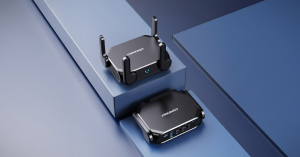
You need Multi-Gig. The CF-WR632AX gives you one 2.5 G WAN/LAN port rated at 2 500 Mbps—enough headroom for tomorrow’s speed tiers. Pocket-size and USB-C powered, it slips into a backpack yet still eliminates the port-speed bottleneck wherever you go.
Bottom line
Match the port to the plan, then add a little extra for growth. Do that once and you will never again wonder why your “fast new internet” still feels slow.